A green “active” toggle does not mean a CRM workflow is healthy. Revenue automation is healthy when the team can tell which records should have moved, which actually moved, what failed, who owns the failure, and how to recover without creating duplicates.
That requires more than platform error messages. It requires a run ledger tied to business outcomes.
If the workflow writes into lifecycle stages, routing, ownership, or customer records, AI-powered CRM consulting can define the writable paths, approval checks, and rollback conditions before an automation miss turns into a revenue-data cleanup project.
The distinction is practical. A workflow can execute every technical step and still leave a lead unassigned, a renewal without an owner, or an opportunity with the wrong lifecycle state.
Define the business invariant
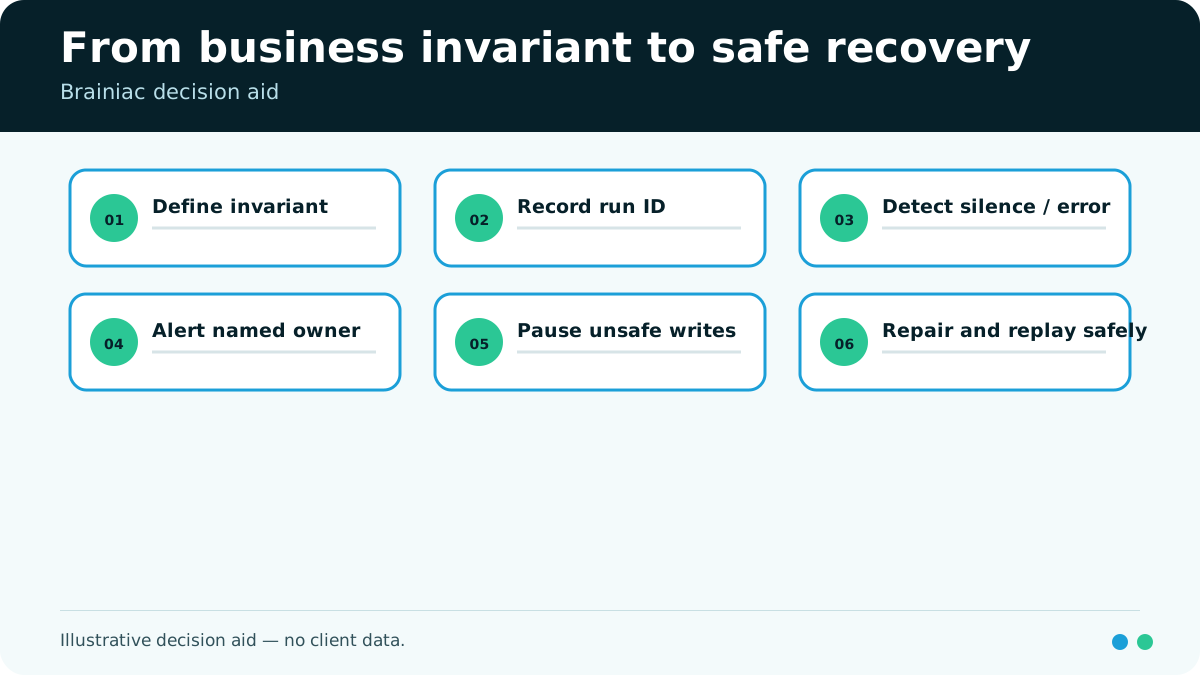
Begin with the condition that should remain true when the workflow works. Call it a business invariant: a statement the team can test independently of the automation’s own success message.
Examples include:
- Every accepted inbound lead has one eligible owner within the defined service window.
- Every closed-won opportunity creates one implementation handoff record.
- Every renewal due inside the operating window has a named owner and next action.
- No contact receives the same protected notification twice for one event.
The invariant should name the population, expected state, timing, and exceptions. “Routing is working” is too vague to monitor. “Every eligible lead has exactly one owner within the agreed window” can be reconciled.
Once the invariant exists, technical telemetry has a business reference point.
Give every run an identity
Each workflow run needs a durable identifier that follows the event across systems. Without it, an operator may see a CRM error, an integration retry, and a downstream notification without knowing they belong to the same business event.
A minimum run ledger records:
| Field | Why it matters |
|---|---|
| Run ID and correlation ID | Connects records across tools |
| Workflow and version | Shows which logic executed |
| Trigger event and source | Establishes why the run began |
| Record IDs | Identifies the affected business objects |
| Start and end time | Supports freshness and delay checks |
| Step status | Locates the first failed or skipped step |
| Attempt count | Exposes retries and loop risk |
| Input and output hashes | Detects changed payloads without copying sensitive data |
| Final business state | Tests the invariant, not just execution |
| Owner and recovery status | Makes the failure operable |
Do not log sensitive fields merely because they are available. Record the minimum evidence needed to diagnose the workflow, apply access controls, and define retention with security and compliance owners.
Monitor silence as well as errors
Explicit failures are the easy cases. Silent failures occur when nothing arrives, a filter excludes the wrong records, a source stops sending events, or the workflow finishes without the intended business effect.
Use three classes of checks:
- Execution checks detect errors, timeouts, retries, and rejected writes.
- Freshness checks detect missing or late events compared with an expected cadence.
- Reconciliation checks compare the source population with the required final state.
HubSpot’s current workflow health page, for example, surfaces workflows that need review and workflows with no enrollments for a sustained period. That is useful product-level visibility, but a cross-system revenue process still needs its own business reconciliation. HubSpot’s workflow health documentation shows the difference between workflow reporting and the broader control plane a team may need.
Silence should be interpreted carefully. A campaign may legitimately have no eligible records. The alert should compare actual activity with a defined expectation, not assume that zero is always wrong.
Alert on action, not anxiety
An alert should tell the recipient what failed, what is at risk, and what decision or action is required. A stream of raw errors trains the team to ignore the channel.
Design alert routes around severity and ownership:
| Condition | Example response |
|---|---|
| One recoverable record failure | Queue for retry or operator review |
| Repeated failure for one rule | Pause that path and alert the workflow owner |
| Missing event feed | Alert integration owner and start reconciliation |
| Duplicate action risk | Stop retries until state is verified |
| Broad invariant breach | Escalate to RevOps and affected business owner |
Each alert should include the run ID, workflow version, affected record, first failed step, current business state, safe recovery options, and owner. Links should open the exact evidence, not a generic dashboard.
Assign four kinds of ownership
“RevOps owns it” is not enough. The workflow crosses business rules, applications, data, and operations. Those may have different owners.
Name:
- A business owner for the invariant and exceptions
- A system owner for configuration and permissions
- A data or integration owner for transport and mappings
- An incident owner for triage, communication, and recovery
One person may hold several roles in a small team. The roles still need to be explicit. Otherwise, the CRM admin may repair a technical step without authority to resolve a territory dispute, or Sales may change a rule without understanding its integration effects.
Ownership also applies to changes. Every production edit should record who approved it, what version changed, which tests ran, and how the prior version can be restored.
Design recovery before the alert fires
Recovery is part of the workflow design. Decide what happens after partial completion, uncertain responses, expired credentials, stale data, and duplicate retries.
Use a recovery ladder:
- Verify the actual current state.
- Stop automatic retries when state is uncertain.
- Determine the first incomplete or incorrect step.
- Choose replay, compensating action, manual repair, or rollback.
- Re-run reconciliation against the business invariant.
- Preserve the incident as a regression case when the failure could recur.
An idempotency key or equivalent duplicate-protection control should prevent the same event from creating the same effect twice. Where an action cannot be reversed, recovery may require a compensating action and human approval rather than a technical rollback.
Use a control-plane review, not a dashboard tour
A useful observability review follows one real workflow from trigger to business outcome. It asks:
- Can every expected event be counted?
- Can one run be traced across systems?
- Can the final state be checked independently?
- Are late and missing events detectable?
- Does each alert reach someone with authority to act?
- Can the team replay or repair without duplication?
- Are changes versioned and regression-tested?
The answers reveal whether the team has an operated revenue system or a collection of active automations.
Brainiac can help map that cross-system run ledger, define the business reconciliations, and assign alert and recovery ownership. The commercial value comes after the operational value: fewer silent handoff failures and faster, safer recovery when revenue automation breaks.