

A tracking plan analytics framework works as the single source of truth for every event, property, and KPI your team measures. The first two actions matter more than any template: name the KPI you need to prove, then write one minimal event spec row that maps directly to it. Treat the document as living, and back it with automated validation rather than periodic manual review.
TL;DR:
- Map each KPI to one primary event before coding, then record its properties, type, required status, owner, and test cases in a canonical plan.
- Use client side SDKs for speed, Google Tag Manager for marketing events, or server side tagging when reliability and privacy matter more than engineering effort.
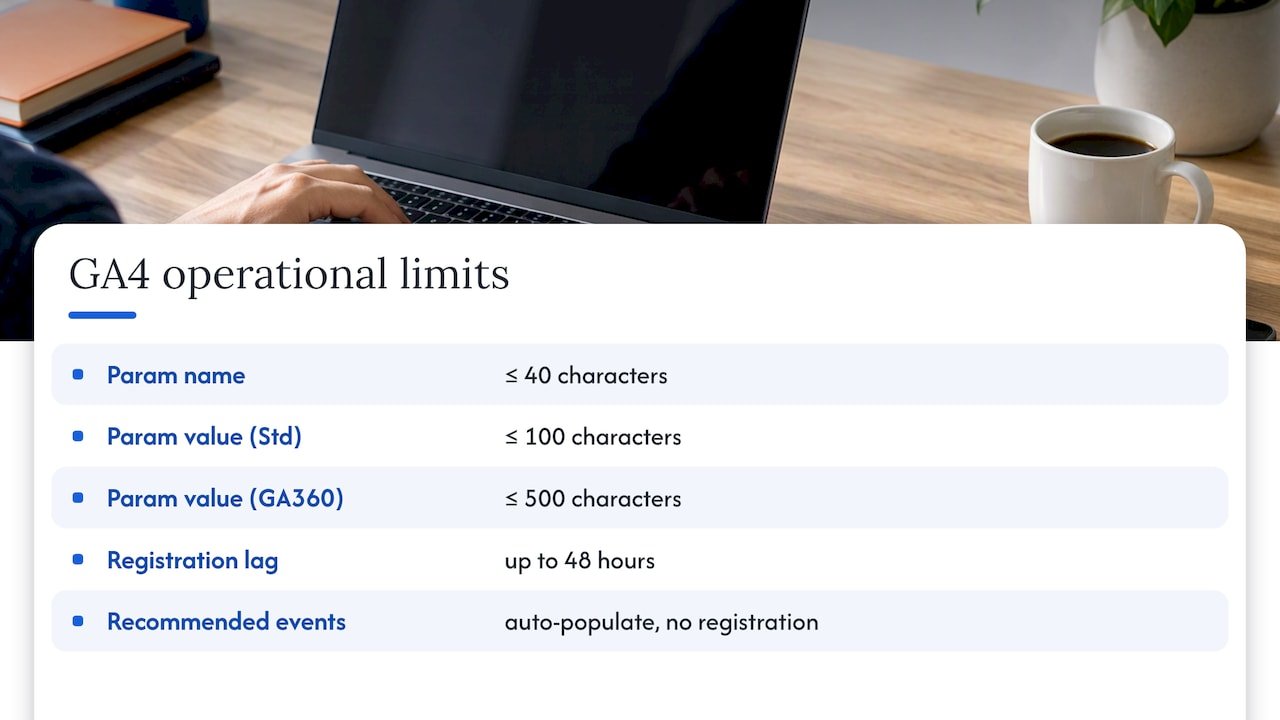
- GA4 parameter names allow 40 characters, while values allow 100 on standard properties and 500 on GA360; longer values may be silently truncated or dropped.
- New custom dimensions and metrics can take up to 48 hours to appear in standard reports, while recommended events avoid registration and its delay.
- Automate checks for missing events, incorrect parameter types, and cardinality spikes; account for denied consent because tags send pings instead of full event payloads.
Table of Contents
- What a tracking plan is and why it matters
- Core components: events, properties, traits, and KPI mapping
- Step-by-step implementation workflow: design to registration
- GA4 operational notes: limits and registration delays
- Monitoring and governance: enforcement and consent
- Tools, templates, and starter artefacts to ship a plan fast
- How we run tracking-plan engagements
- In-house or specialist: a short decision checklist
- How Brainiac Consulting can help: pilot audit and delivery offers
- FAQ
- Sources
What a tracking plan is and why it matters
A tracking plan is the shared document, usually a spreadsheet or wiki page, that lists every event, property, and KPI your analytics setup is meant to capture. It tells engineers what to build, tells analysts what to expect in reports, and gives stakeholders a single reference for what “data quality” actually means. Twilio’s guidance on building a tracking plan frames it as a document that summarizes which events and properties to track, justifies why each one matters, and records where it lives in the codebase.
Without that shared reference, implementation churn creeps in fast: two teams name the same event differently, a property gets typed as a string in one release and a number in the next, and nobody can explain why a dashboard suddenly shows zero conversions.
We recommend creating or updating the plan at specific trigger points:
- Before any product launch that introduces new user flows or conversion paths
- Whenever a KPI definition changes or a new one gets added to a quarterly goal
- Ahead of major releases that touch checkout, signup, or other high-value funnels
- After a platform migration (GA4 property changes, new CDP, new CMS)
Core components: events, properties, traits, and KPI mapping
A usable spec needs a few non-negotiable elements. Event names should be stable, semantic, and human-readable, something like checkout_completed rather than a dynamic string built from a page title or timestamp. Dynamic names fragment your reporting because every variation becomes a separate row in GA4’s event table.
Properties (GA4 calls these parameters) need a defined type, a cardinality expectation, and a reason for existing. A property with unbounded cardinality, like a raw search query, behaves very differently in reporting than a bounded one like plan_tier with four possible values.
For B2B flows specifically, user identity fields matter more than most teams plan for: account ID, domain, and role should travel with every event, not just the user ID, or attribution breaks the moment a buying committee spans multiple logins.
Your plan should include:
- event_name: the stable, semantic identifier
- properties: name, type, and whether it’s required or optional
- KPI mapping: which business metric this event feeds
- owner: who is accountable when the event breaks
Pro Tip: Map every KPI to exactly one primary event before you write a single line of tracking code. If you can’t name that event, the KPI isn’t ready to track.
Step-by-step implementation workflow: design to registration
Moving from a blank spec to live, trustworthy data follows a predictable sequence. Skipping steps is the most common reason tracking plans decay within a quarter of launch.
- Form the goal and map it to KPIs. Write down the business question first, then the KPI that answers it, then the event. This order prevents teams from instrumenting everything “just in case,” which is how tracking plans become unreadable.
- Build the spec artefact. Use columns for event_name, description, properties, type, required (yes/no), owner, and test cases. This structure doubles as your QA checklist later.
- Choose instrumentation. Client-side SDKs are fastest to ship but weakest on reliability; Google Tag Manager suits marketing-owned events; server-side tagging and the Measurement Protocol give you control over payload structure and are harder for ad blockers to interrupt.
- Verify before shipping. Use GA4’s DebugView and Realtime reports to confirm events fire with the right parameters, then validate server-side payloads against Measurement Protocol’s
validation_behaviorsetting. Google’s Measurement Protocol reference documents bothRELAXEDandENFORCE_RECOMMENDATIONSmodes, use the stricter mode in testing, relax it once you’re confident in production. - Register and control change. Create the custom dimensions and metrics you need in reports, stage the release, and publish short release notes so analysts aren’t guessing why a chart shifted.
Each gate catches a different failure mode: step 1 stops scope creep, step 4 catches silent data loss, step 5 prevents the “why is this metric empty” ticket that lands two weeks after launch.
GA4 operational notes: limits and registration delays
GA4 enforces specific technical limits that catch teams off guard. Custom parameter names must stay at 40 characters or fewer, and parameter values are capped at 100 characters on standard GA4 properties, 500 on GA360. AnalyticsMania’s walkthrough of custom event tracking notes that exceeding either limit doesn’t throw an error, it silently truncates or drops the value, which is far worse than a visible failure because nobody notices until a report looks wrong weeks later.
Registration lag can take up to 48 hours before a newly created custom dimension or metric starts populating in standard reports, so build that delay into your launch timeline rather than panicking when data doesn’t appear immediately.
Where possible, prefer GA4’s recommended events over custom ones. Recommended events auto-populate predefined dimensions and metrics without any registration step, which saves both the 48-hour wait and a line item in your spec.
Monitoring and governance: enforcement and consent
Static documentation ages the moment a sprint ships. In teams releasing weekly, a tracking plan reviewed quarterly is already out of date, which is why guidance on GA4 event parameters points toward automated schema enforcement that blocks or flags events deviating from the plan, rather than relying on a human to notice.
Automate checks for:
- Missing events that should fire but don’t appear in a given session window
- Parameter types that don’t match the spec (a string arriving where a number was expected)
- Sudden spikes in cardinality, which usually mean a dynamic value leaked into a property that should be bounded
Consent handling deserves the same rigour. Google’s consent mode documentation explains that when a user denies consent, tags adjust behaviour and send consent “pings” instead of full event payloads, so your conversion modelling needs to account for that gap rather than treating it as a data quality defect.
Pro Tip: Build a rollback plan alongside every tracking release: if an alert fires post-launch, you should be able to revert the tag configuration within minutes, not file a ticket and wait.
Tools, templates, and starter artefacts to ship a plan fast
You don’t need custom software to start. A spreadsheet with one row per event, a wiki page with the same columns, or a lightweight Git-tracked YAML file all work, what matters is that one document stays canonical and owned.
- Start with a minimal template: event_name, properties, KPI, owner, and status (shipped, planned, deprecated)
- Keep the living plan in a tool your whole team already checks, Confluence and Git-based docs both work if ownership is clear
- Choose enforcement rigour deliberately: advisory (flag only), validation-only (log violations), or blocking (reject malformed events) depending on release risk
- Favour server-side tagging when privacy rules or ad-blocker loss are a bigger risk than engineering overhead
Teams managing GA4 and Google Tag Manager configurations at scale sometimes bring in dedicated support for that layer specifically; Parent Technology’s GA4 and GTM service is one example of specialized setup help for that narrower technical slice.
How we run tracking-plan engagements
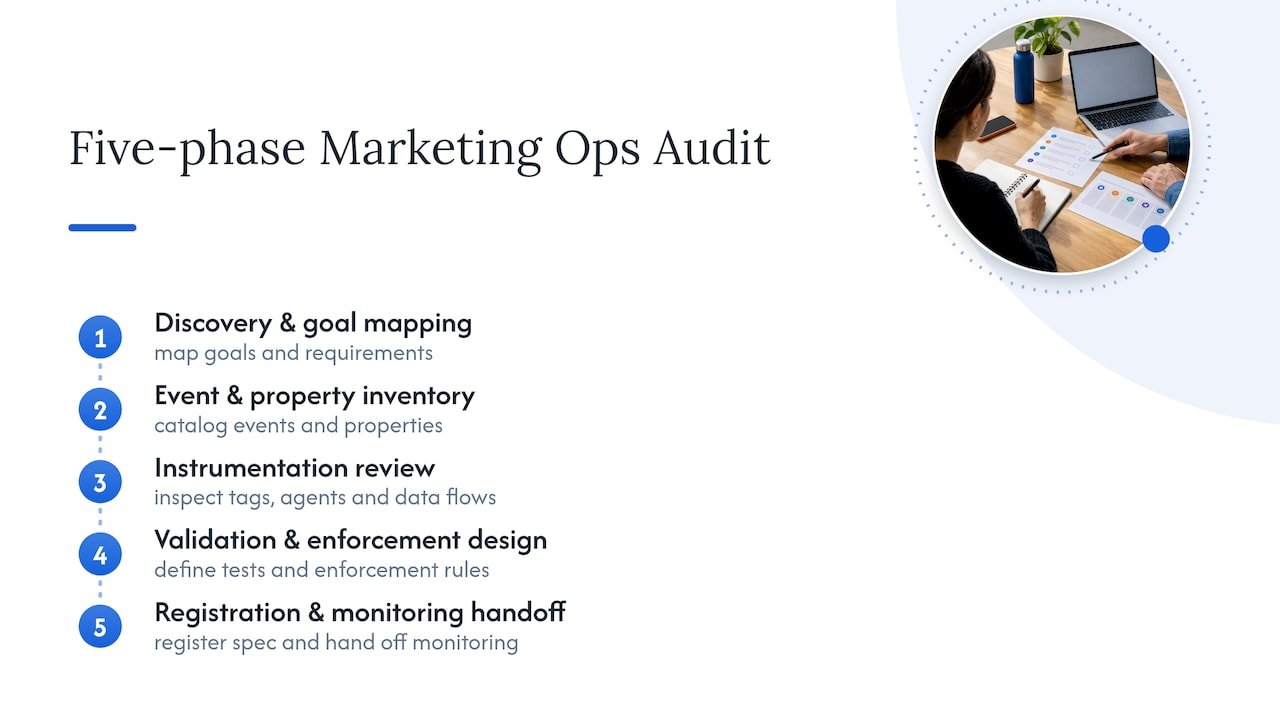
We run tracking-plan work through a five-phase Marketing Ops Audit: discovery and goal mapping, event and property inventory, instrumentation review, validation and enforcement design, and registration with a monitoring handoff. Each phase maps directly onto the design-to-registration workflow above, so the audit output is a spec your team can implement, not a slide deck.
We build on open-source integrations rather than proprietary black boxes, which means your team retains visibility into every tag, agent, and data flow we touch. For B2B accounts specifically, we remediate the identity gaps, missing account ID, inconsistent domain matching, that break attribution when a buying committee spans several logins. Details on our revenue attribution services cover how clean tracking plans feed directly into accurate multi-touch attribution.
In-house or specialist: a short decision checklist
Weigh team capacity, release cadence, privacy complexity, and B2B identity complexity. A small pilot audit tests the vendor route before a full commitment.
— Don
How Brainiac Consulting can help: pilot audit and delivery offers
If your tracking plan has drifted from what’s actually firing in production, we offer a pilot five-phase audit to validate the spec against live data and surface enforcement gaps before they cost you another quarter of reporting. Our marketing operations optimization and support service picks up the implementation and monitoring work once the audit is done.
Visit the Brainiac Consulting landing page to scope a pilot audit for your tracking plan.
FAQ
What is a tracking plan in analytics?
A tracking plan is a shared document, typically a spreadsheet or wiki page, that lists every event, property, and KPI your analytics setup should capture. Twilio’s tracking plan guide describes it as the document that justifies why each event is tracked and records where it’s implemented in code.
How long does GA4 take to register a custom dimension?
Registration lag can take up to 48 hours before a newly created custom dimension or metric starts appearing in standard reports. Build that delay into your launch timeline rather than treating empty data as a tracking failure.
Should I use GA4 custom events or recommended events?
Check GA4’s recommended events first, since they auto-populate predefined dimensions without any registration step. Reserve custom events for metrics recommended events genuinely can’t capture.
What causes tracking plans to go out of date?
Weekly or biweekly release cycles outpace quarterly manual reviews, which is why guidance on GA4 event parameters recommends automated schema enforcement over periodic audits. Automated checks catch missing events and type mismatches the day they happen, not weeks later.
How does consent mode affect conversion tracking?
When a user denies consent, Google’s consent mode documentation explains that tags send consent pings instead of full event payloads, creating gaps your model needs to account for. Planning for consent states during the design phase avoids treating these gaps as tracking bugs later.
Sources
- How to track custom events with Google Analytics 4
- Data Tracking: How to create a successful data tracking plan
- Recommended events – Analytics Help
- Measurement Protocol reference | Google Analytics | Google for Developers