
If you take away one thing from this guide, take this: plan and document before you build, develop in a sandbox with realistic bulk data, never put DML or SOQL inside a loop, split complex logic into subflows, and put a fault path on every element that can fail. These five habits prevent most of the production incidents we see in Flow-driven orgs, and they hold whether you are automating a simple approval or orchestrating multi-object logic across sales and finance.
TL;DR:
- Building and testing flows in sandbox with realistic data prevents data integrity issues and ensures performance under actual volume conditions.
- Modular design using targeted subflows and proper naming conventions improves maintainability, especially for system-context operations.
- Avoid placing DML or SOQL operations inside loops, and instead collect records during iteration to perform bulk operations after the loop ends.
- Use before-save flows for faster performance on same-record updates and reserve after-save flows for related record changes or notifications.
- Implement fault paths on all critical elements to enable error tracking, centralized logging, and safer retries, reducing operational risk.
Table of Contents
- Plan and document every flow before you build
- Develop and test in sandboxes before anything touches production
- Architecture: modular flows and subflows for micro-automation
- Bulkification: why DML and SOQL inside loops break at scale
- Run context matters: before-save, after-save, and who the flow runs as
- Error handling and observability: fault paths and centralized logging
- Debugging and performance testing before deployment
- Maintainability and reuse: naming, templates, and governance
- Running Flow automation at enterprise scale: what actually holds up
- How Brainiac AI helps teams put these standards into practice
- Sources
- FAQ
Plan and document every flow before you build
A Flow that starts life as a documented plan is easier to build, easier to hand off, and far easier to fix six months later when the person who built it has moved to a different team. Before you open Flow Builder, map the business process on paper or in a diagram: what triggers it, what the entry criteria are, what the expected outcome looks like, and who owns the exception cases. Salesforce’s own guidance on planning for Flow success treats this planning stage, along with sandbox testing and avoiding hard-coded IDs, as a baseline expectation rather than a nice-to-have.
Once the process is mapped, translate it into a start type. A record-triggered flow that fires on every save is a different design decision than one scoped to a narrow entry condition, and the entry criteria you choose will shape performance later. Write the flow description before you add a single element: what problem it solves, what object and record types it touches, and any dependency on other automation. That single paragraph saves the next person (possibly you, a year from now) from reverse-engineering intent from element names alone.
Documentation inside the flow matters just as much as documentation around it:
- Give every element a label that describes what it does, not what type it is, so “Update Opportunity Stage” beats “Assignment 3”.
- Use consistent API names that mirror the labels, since API names cannot be changed after creation.
- Add resource descriptions for variables and formulas whose purpose is not obvious from the name alone.
- Note version rationale in the flow’s description or in a linked change log whenever you branch a new version, explaining why the change was made, not just what changed.
A short do and don’t makes the standard concrete. Don’t name a decision element “Decision”; do name it “Check Region Equals APAC”. Don’t leave a formula resource called “formula1” holding a discount calculation; do call it “Discount_Percent_Formula” with a one-line description of the business rule it encodes.
Pro Tip: Treat the flow description field as the README for your automation: five minutes writing it saves hours of investigation during an incident review.
This discipline echoes what the Admin blog’s guide to Flow best practices and standards frames as treating Flow development like software engineering rather than a series of quick, unplanned edits made directly in production. Version control, structured reviews, and a documented rationale for change are the difference between an automation portfolio you can trust and one nobody wants to touch.
Develop and test in sandboxes before anything touches production
Building directly in production is the single fastest way to turn a small logic error into a data-integrity incident. Sandbox-first development is not a formality: it is where you catch the bulk-data problems, permission gaps, and record-type edge cases that never show up when you test with three sample records, benefiting from Salesforce Commerce Cloud SEO Automation best practices to optimize your processes. Salesforce’s planning guidance recommends testing with realistic data volumes and using debug tools before anything reaches a production org.
A practical pre-deployment routine looks like this:
- Build and unit-test the flow in a full or partial sandbox that mirrors production’s object model and record types.
- Load bulk test data, ideally through Data Loader, that reflects real record counts, not a handful of sample rows.
- Run the flow against multiple user profiles, including the most restrictive one your org uses, to confirm field-level security and sharing behave as expected.
- Trigger the async and error paths deliberately, not just the happy path, to confirm fault connectors fire and recovery logic works.
- Automate the checks with Flow Tests and the Salesforce CLI (
sf flow run test) so the same suite runs on every future change instead of relying on manual re-testing.
Many flows built without CI-integrated tests risk regressions going undetected until a real user hits them in production, which is why recent Flow release updates made Flow Tests and CLI-friendly testing a first-class part of the build cycle rather than an afterthought.
Your pre-deployment checklist should confirm four things before a flow ships: it behaves correctly across the profiles that will actually run it, it respects record types with different page layouts or validation rules, it survives a bulk update of the volume your business actually processes, and its asynchronous paths (scheduled paths, platform event triggers) complete without leaving partial data behind. Skipping any one of these is how a flow that worked in testing fails the first time marketing imports two thousand leads.
Architecture: modular flows and subflows for micro-automation

Large, monolithic flows that try to handle every scenario for an object are hard to read, hard to test, and hard to change safely. The alternative, often called micro-automation, is to build several small, purpose-specific flows instead of one flow that does everything. Guidance from the Admin blog on the shift away from Workflow Rules and Process Builder frames this as a deliberate move: splitting logic into targeted flows with narrow entry criteria reduces the CPU time each transaction consumes and makes troubleshooting far more direct, because you know exactly which flow owns which piece of behaviour.
Subflows are the mechanism that makes this practical without duplicating logic across every parent flow. A subflow is reusable logic (a validation routine, a notification pattern, a scoring calculation) called from multiple parent flows, so a change in one place propagates everywhere it is used. That reuse only pays off when the subflow is genuinely single-purpose.
- Keep each subflow narrow enough to describe in one sentence, such as “calculates territory assignment from postal code.”
- Separate steps that need system context (bypassing the running user’s permissions) into their own subflow rather than mixing them with user-context steps in the same flow.
- Name subflows with the same discipline as parent flows: purpose first, object second, so a maintainer can guess what a subflow does from its name alone.
- Version subflows independently and note in the parent flow’s description which subflow versions it depends on.
- Store a short usage note with each subflow explaining which parent flows call it, so a change reviewer knows the blast radius before editing it.
The system-context separation deserves particular attention. When a subflow needs to update a record the running user cannot normally edit, isolating that logic in its own subflow marked to run in system context keeps the privilege escalation contained and auditable, rather than buried inside a larger flow where it is easy to miss during a security review.
Granularity is a judgment call, and it is worth resisting the urge to subflow everything. A three-element flow that will only ever be used once does not need to be broken apart for the sake of tidiness. The rule of thumb we use with clients: if a piece of logic appears in more than one parent flow, or if a section of a flow is complex enough to need its own testing story, it belongs in a subflow. Everything else can stay inline.
Bulkification: why DML and SOQL inside loops break at scale
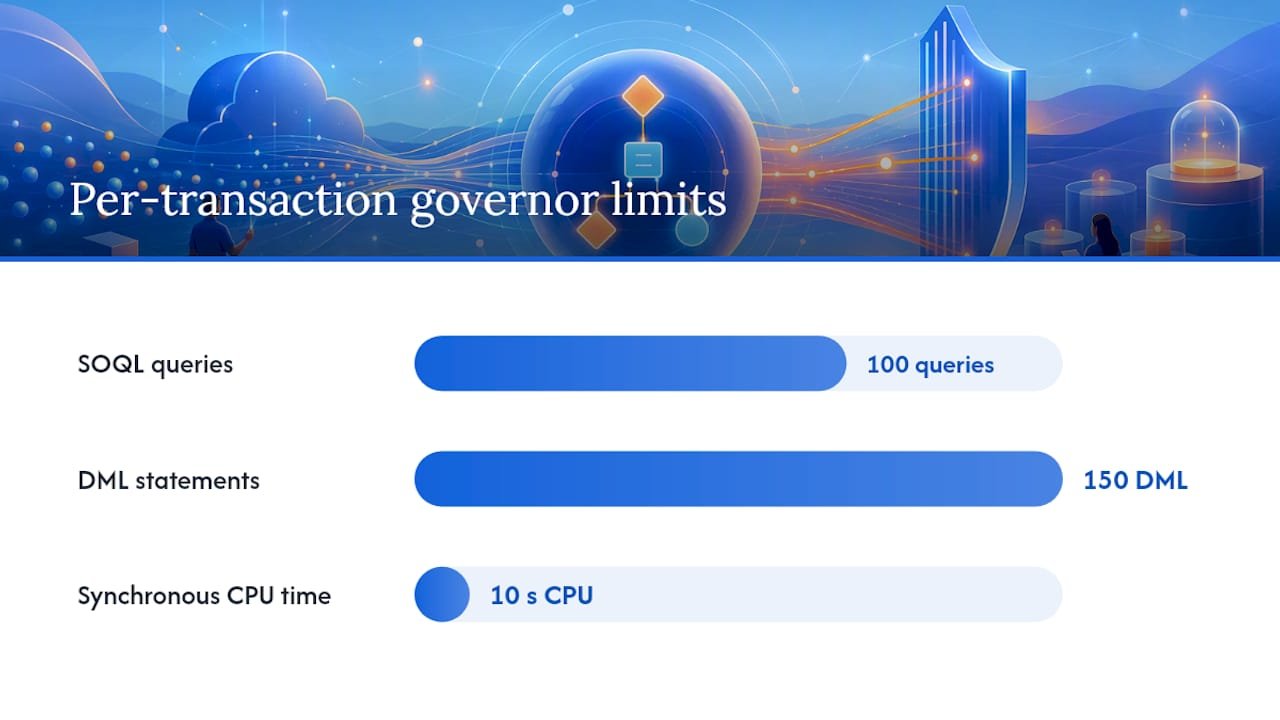
The single most common cause of Flow failures in production is a DML or query operation placed inside a loop. Flows execute inside per-transaction governor limits, and Trailhead’s module on avoiding Flow limits documents the ceilings clearly: 100 SOQL queries per transaction, 150 DML statements per transaction, and a synchronous CPU limit of 10 seconds. A flow that queries or writes once per loop iteration burns through these limits the moment record volume climbs past a handful of rows, and it will pass every test you ran with three sample records before failing the first time someone imports a real batch.
The fix is the same pattern every time: collect records into a variable during the loop using an Assignment element, then perform a single Create, Update, or Delete operation after the loop finishes. Salesforce’s bulkified record processing example walks through exactly this transformation and quantifies the difference: processing 20 opportunities with 5 team members each requires roughly 100 DML operations under a naive per-record design, versus around 20 after bulkification collects the records first.
Conceptually, the pattern reads like this: start a loop over the incoming collection, inside the loop use an Assignment element to add the record you want to change to a collection variable, and once the loop ends, pass that entire collection to a single Update Records element. Nothing inside the loop touches the database directly.
| Governor limit | Per-transaction ceiling | Failure mode when ignored |
|---|---|---|
| SOQL queries | 100 | Query inside a loop exhausts the ceiling on bulk runs |
| DML statements | 150 | DML inside a loop multiplies statements per record |
| Synchronous CPU time | 10 seconds | Heavy per-record processing times out mid-transaction |
Pro Tip: If you inherit a flow with a Get Records or Create Records element sitting inside a loop, that is the first thing to fix, before you touch anything else in the flow.
For volumes that stay in the hundreds or low thousands, in-loop collection plus a single after-loop DML operation is usually enough. When your process routinely needs to touch tens of thousands of records in one run, Salesforce recommends moving that logic to an asynchronous or scheduled path rather than forcing it through a synchronous record-triggered flow, since batch-style processing is built to run outside the tighter synchronous CPU window.
- Never place a Get Records, Create Records, Update Records, or Delete Records element inside a loop.
- Use Assignment elements to build a collection variable across loop iterations, then act on the whole collection once.
- Route very high-volume or scheduled-style processing to asynchronous paths so it runs outside the synchronous limit window.
Run context matters: before-save, after-save, and who the flow runs as
Choosing the right run context is a performance decision as much as a design one. A before-save (fast field update) record-triggered flow runs earlier in the save pipeline, updates only the record that triggered it, and skips a separate DML operation entirely, which discussion of record-triggered flow context on Salesforce StackExchange notes can make it dramatically faster, up to ten times, than an equivalent after-save flow performing the same field updates. The trade-off is scope: before-save flows can only touch fields on the triggering record itself, so anything that needs to update a related record, send an email, or call another process has to run after-save.
System versus user context is a separate axis. Most flows run in the context of the user who triggers them, respecting that user’s field-level security and sharing rules, which is usually what you want. A subflow explicitly configured to run in system context bypasses those restrictions, which is sometimes necessary (a routine that needs to update a locked field a standard user cannot touch) but should be treated as a deliberate, documented exception rather than a default setting.
- Use before-save flows for same-record field calculations and defaults, since they are faster and avoid an extra DML operation.
- Reserve after-save flows for anything that touches related records, sends notifications, or calls Apex or subflows.
- Mark a subflow to run in system context only when the business requirement genuinely needs it, and note the reason in the flow’s description.
- When several flows target the same object, use Flow Trigger Explorer to set and review execution order, so you are not guessing which flow runs first.
Getting this wrong tends to surface as one of two symptoms: a flow that mysteriously cannot see or update a field it should have access to, or two flows on the same object stepping on each other because nobody set an explicit order. Both are avoidable with a five-minute check in Flow Trigger Explorer before you activate a new flow on a heavily automated object.
Error handling and observability: fault paths and centralized logging
Every element in a flow that performs a DML operation, a callout, or an action capable of failing needs a fault connector, full stop. Without one, a failure produces a generic, unhelpful error for the end user and leaves the admin with no record of what happened or why. Guidance on planning Flow automation that scales treats a mandatory fault connector on every critical element as a baseline requirement for enterprise-grade automation, not an advanced technique reserved for complex flows.
A well-designed fault path does three things: it shows the user a plain-language message instead of a raw system error, it notifies an admin or owner when the failure matters operationally, and it records the failure somewhere searchable. That third piece is where centralized logging comes in.
- When an element fails, route the fault path to publish a platform event carrying the failure details rather than just ending the flow.
- Build a separate platform-event-triggered flow whose only job is to catch that event and write it to a custom error log object.
- Capture structured fields on that log record: the flow’s API name, the failing element’s API name, the running user, a snapshot of the input payload, a timestamp, and the failure message itself.
- Give admins a list view or report on that error object so recurring failures surface without anyone having to dig through debug logs.
- Where a failure leaves a record half-updated, design a compensation step, an async cleanup flow, or a retry mechanism so the next run does not simply repeat the same partial failure.
The same guidance on planning for scale recommends exactly this structure, capturing the flow name, element, running user, and payload snapshot so failures become searchable and dashboard-ready rather than a one-off error message nobody kept.
Pro Tip: A fault path that only shows the user an error screen is half a solution: pair it with a logging flow so the same failure shows up on an admin’s dashboard, not just on one user’s screen.
Idempotency deserves a specific mention here. If a flow fails partway through a multi-step process, a retry should be safe to run again without creating duplicate records or double-charging a transaction. Designing for that upfront, rather than discovering the problem during an incident, is what separates a flow that recovers gracefully from one that compounds its own failure.
Debugging and performance testing before deployment
Slow flows rarely announce themselves clearly. They show up as timeouts, occasional CPU-limit errors under load, or user complaints about a page that “sometimes” hangs on save. The debug panel is the first tool to reach for, and recent releases made it considerably more useful: Summer ’25 improvements to Flow introduced a card-style debug panel that makes it easier to see which element consumed the most time or resources in a given run, alongside clearer warnings when a flow places a callout inside an immediate (non-async) path.
- Step through the debug panel element by element to find which one is doing the most work, rather than guessing from the outside.
- Watch for
FLOW_ELEMENT_LIMIT_USAGEentries in Apex debug logs, which flag elements approaching governor-limit thresholds. - Run Flow Tests through the Salesforce CLI (
sf flow run test) as part of your normal build process, not just before a release. - Include at least one deliberate failure case in every test suite so your fault paths are exercised automatically, not just the happy path.
- Track SOQL query counts and DML statement counts per run, since a flow that quietly creeps upward in either is heading toward the same 100-query, 150-DML ceiling covered earlier.
Flow Tests and CLI-based automation are becoming the standard way teams catch regressions before they reach users, and recent Flow release notes confirm that CLI-friendly testing was built specifically to plug into CI/CD pipelines rather than remain a manual, click-based chore.
A reasonable performance acceptance checklist before deployment asks four questions: does the flow complete comfortably inside the synchronous CPU window under realistic volume, does its SOQL and DML count stay well under the per-transaction ceilings, does every fault path fire correctly when you force a failure, and does the debug panel show any single element consuming a disproportionate share of the run. When an element is heavy, the usual remediation is narrowing its filter criteria, reducing the fields or records it retrieves, or moving that piece of logic to an asynchronous path where the time pressure is lower.
Maintainability and reuse: naming, templates, and governance
A Flow portfolio that grows without governance eventually becomes something nobody wants to touch, because nobody is sure what depends on what. Consistent naming is the cheapest fix available. A pattern like purpose_object_trigger_env (for example, discount_opportunity_beforesave_prod) tells a maintainer what the flow does, what it touches, when it fires, and where it lives, without opening the flow at all. Apply the same discipline to resource and variable API names inside the flow, since a formula called varTemp2 tells the next person nothing.
Reuse is where recent platform changes help directly. Save-as-template functionality introduced in Summer ’25 lets a team turn a well-built flow into a starting point for future automation, enforcing consistent structure and naming across a team rather than every builder starting from a blank canvas.
- Maintain a shared library of approved subflows and templates so builders reuse proven patterns instead of reinventing them.
- Save a flow as a template once it represents a pattern your team expects to repeat, and document what it assumes about the calling context.
- Assign an owner to every flow, not just a creator, so there is always someone accountable for it when a change request comes in.
- Review flows before activation the way you would review code: a second set of eyes on entry criteria, fault paths, and bulkification.
- Schedule periodic audits of active flows to catch ones that are no longer needed, and retire them formally instead of leaving them running unused.
Governance does not need to be heavy to be effective. A quarterly audit that checks for deactivated but undeleted flows, duplicate logic across flows on the same object, and any DML-in-loop patterns that slipped through review will catch most of the drift that accumulates in a fast-moving org.
Running Flow automation at enterprise scale: what actually holds up
Operating automation across marketing, sales, and finance objects at volume teaches you which best practices are cosmetic and which ones actually prevent incidents. Fault paths and centralized logging are the ones that matter most in practice: an org with structured error capture on every critical flow finds and fixes problems in hours, while one relying on generic error banners finds out from a frustrated end user days later. Governance habits, ownership, scheduled audits, and a retirement process for obsolete automation, are what keep a growing flow portfolio from becoming unmanageable as the business adds more automated processes.
There is a genuine trade-off worth naming honestly: maximal reuse is not always the right call. Subflowing every three-element pattern in the name of DRY (don’t repeat yourself) design can leave you with a web of dependencies that is harder to trace than a small amount of duplication would have been. We generally accept duplication when a flow is unlikely to be reused elsewhere and reserve subflows for logic that genuinely repeats across processes or that needs isolated testing and system-context separation. Readers weighing whether their CRM’s automation and data practices are ready for more advanced AI-driven workflows may find it useful to review CRM readiness for AI agents, which covers data hygiene and observability considerations closely related to the standards described here.
— Don
How Brainiac AI helps teams put these standards into practice
Building a handful of well-documented flows is one thing. Keeping hundreds of them healthy across sales, marketing, and finance objects as your org grows is a different problem, and it is the one we spend most of our time solving with clients. Our Marketing Operations Optimization and Support service audits existing automation for the exact issues covered in this guide: DML inside loops, missing fault paths, flows running in the wrong context, and naming conventions that have drifted across teams.
For teams whose automation needs go beyond what Flow Builder alone can support, our Agentic AI Enablement and Custom Agent Deployment services extend CRM automation with AI agents that handle lead enrichment, intent scoring, and cross-system data work, integrated with the Salesforce automation you already have rather than replacing it. Our CRM workflow observability approach applies the same logging and recovery principles described above across the full stack, not just inside individual flows.
If you are not sure where your current automation stands, a practical next step is an audit that reviews active flows against established standards, flags the highest-risk gaps, and provides a prioritized remediation plan. Visit Brainiac AI to see the full range of services and start that conversation.
Sources
- The Ultimate Guide to Flow Best Practices and Standards
- Plan for success with Flow Builder best practices (Salesforce Help)
- Avoid flow limits (Trailhead)
FAQ
What are the most important Salesforce Flow best practices?
The essentials are planning and documenting a flow before you build it, developing in a sandbox with realistic bulk data, avoiding DML or SOQL inside loops, and adding a fault connector to every element that can fail. Salesforce’s own planning guidance treats these as baseline expectations rather than advanced techniques.
Why should I avoid DML and SOQL inside a loop?
Flows are bound by per-transaction governor limits, and Trailhead documents these ceilings as 100 SOQL queries, 150 DML statements, and 10 seconds of synchronous CPU time. A query or DML operation placed inside a loop multiplies with every record processed, so a flow that passes testing with a handful of records can fail entirely once it runs against a real bulk update.
What is the difference between before-save and after-save flows?
A before-save flow updates only the triggering record and skips a separate DML step, which makes it considerably faster for same-record field changes. An after-save flow runs slightly later and is required whenever the logic needs to touch related records, send notifications, or call a subflow or Apex.
How should I handle errors in a Flow?
Every element capable of failing needs a fault connector that shows the user a clear message and records the failure for later review. A common enterprise pattern publishes a platform event on failure and routes it to a separate logging flow that writes structured details, flow name, element, user, and error message, to a custom error object for tracking.
How do I test a Flow before deploying it to production?
Build and test in a sandbox using realistic bulk data, then run Flow Tests through the Salesforce CLI (sf flow run test) as part of your regular build process rather than a one-off check before release. Include deliberate failure scenarios in the test suite so fault paths get exercised, not just the expected successful path.