
Lead routing automation assigns each inbound lead to the right rep without anyone sorting a queue by hand. The approach that holds up in practice combines clear assignment rules, enrichment at the moment of capture, and active monitoring of what happens after assignment. Get those three working together and speed, ownership and accuracy improve at once.
TL;DR:
- Start with round robin when data is sparse; account based routing requires reliable company matching, and mature teams can layer account, segment, territory, then rotation.
- Enrich records at capture, standardize rule fields with picklists, and send leads with missing required data to a monitored review queue rather than assigning them.
- Pilot one routing method against a matched group, shadow test before launch, and track response time, manual reassignment, SLA acceptance, and conversion by route.
- Prevent repeat assignments by stamping records after routing, lock accepted leads unless exceptions apply, and log every reassignment with its reason for audits.
- Add predictive scoring only after rule based routing and data quality are stable; keep scores explainable, retain human overrides, and compare scored outcomes before expansion.
Table of Contents
- What lead routing automation is and why revenue teams need it
- Which routing method fits your sales motion?
- How do you stop bad data from breaking routing?
- Step by step: design, test and roll out routing rules
- How do you wire routing logic into CRM workflows?
- Which metrics show that routing is working?
- Troubleshooting: what to check when routing accuracy drops
- How does AI improve lead routing and predictive scoring?
- What role do open-source tools play in lead routing?
- What do ROI and business impact look like in practice?
- How do real-time data and intent prediction change routing decisions?
- What security and compliance rules apply to automated routing?
- How to scope a pilot that proves ROI
- Plan your pilot with Brainiac Consulting
- FAQ
- Sources
What lead routing automation is and why revenue teams need it
Every routed lead follows the same path: capture, enrichment, rule evaluation, then an assignment action. A form fill arrives, the system fills in missing company details, the rules decide who should own the lead, and the CRM assigns it and notifies that person. Each step feeds the next, so a weak link early on shows up as a misroute later.
When that flow works, you should see:
- Faster first response, because leads reach a rep promptly rather than waiting for a manager to triage.
- Consistent ownership, helping prevent multiple reps from chasing the same contact or a lead sitting unclaimed.
- Less manual sorting, which frees your operations team to improve the rules instead of policing them.
- Clearer reporting, since every assignment follows a documented logic you can audit.
Automation is only as good as the data and process behind it. If key fields are blank, if territories are undefined, or if nobody has agreed what a “qualified” lead means, pause and fix those first. Routing a bad record quickly just delivers the wrong lead to the wrong rep at higher speed.
Which routing method fits your sales motion?
There is no universal best method. The right choice follows how your team sells and what data you can trust today.
- Round-robin hands leads to reps in rotation. It suits teams with similar roles and a goal of even workload, such as an inbound team handling comparable deals.
- Territory routing assigns by geography, using state, postal code or region. It needs clean location fields and a clear map of who owns which area.
- Segment routing sends leads by firmographics: employee count, revenue band or industry. A mid-market team and an enterprise team, for example, can each receive only the accounts they are built to serve.
- Account-based routing sends a lead to the rep who already owns the matching account. It depends on reliable lead-to-account matching, usually by email domain or company name.
Most mature teams layer these. Account ownership comes first, then segment, then territory, with round-robin as the final tiebreaker inside each group.
Pro Tip: Start with the method that needs the fewest data fields. Round-robin needs almost none, while account-based routing needs the most, so graduate to it only after your matching is trustworthy.
How do you stop bad data from breaking routing?
Data hygiene is the primary technical failure point in routing automation. ZoomInfo’s guide to lead routing makes the point directly: routing rules are only as reliable as the CRM data beneath them, and blank or inconsistent fields can break territory and account matching. Treat this as the core engineering task, not a cleanup chore for later.
Each method depends on specific fields:
- Account-based routing needs email domain and company name.
- Territory routing needs state, country and postal code.
- Segment routing needs employee count, revenue band and industry.
- Round-robin needs only an active, available owner.
The most reliable fix is enrichment on capture. When a lead arrives, the system looks up missing firmographic details before any rule runs, so the rules see a complete record. Continuous enrichment then refreshes those fields as records age. We cover the pipeline stages in our guide to AI lead enrichment for B2B teams.
Put these controls in place:
- Define one canonical field for each routing input and retire duplicates.
- Standardize territory values, so “CA”, “Calif.” and “California” resolve to one entry.
- Normalize company names and domains before matching.
- Handle parent and subsidiary relationships so child accounts route with their parent.
- Block assignment when a required field is still empty and send the record to a review queue.
Pro Tip: Use picklists instead of free text for every field a rule reads. A dropdown cannot produce a typo, and typos are where most silent misroutes begin.
Step by step: design, test and roll out routing rules
A good rollout moves from agreement to evidence to scale. Resist the urge to switch everything on at once.
- Set the targets first. Agree on an acceptance SLA, meaning how fast a rep must accept or act on a lead, and choose pilot success metrics such as speed-to-lead and acceptance rate. Our note on sales handoff automation explains why acceptance SLAs come before tooling.
- Map inputs to rules. For each rule, list the fields it needs and write down what happens when one is missing.
- Document fallback logic. Decide where unmatched or incomplete leads go and who watches that queue.
- Build enrichment and matching. Turn on enrichment at capture and configure lead-to-account matching.
- Shadow test. Run the new rules in parallel with live assignment, recording what they would have done without acting on it.
- Pilot, then roll out. Launch on a limited segment, measure results, then expand.
During the pilot, track:
- Misroute rate, the share of leads reassigned by hand after automation placed them.
- Conversion lift against a comparable group still on the old process.
- Time from capture to first rep action.
- Volume landing in the fallback queue.
When the numbers hold, roll out in waves with rep training and a clear escalation path for disputed assignments. Reps accept automation faster when they know exactly who to call when a lead looks wrong.
How do you wire routing logic into CRM workflows?
Whatever platform you use, the same pattern repeats: an enrichment trigger fires, flags or scores are set, a routing decision is made, and the lead is assigned and the owner notified. Build that sequence once, test it, and reuse it across segments. Our overview of CRM automation workflows and guardrails goes deeper on the control side.
The workflow actions you will use most often:
- Assign the owner field based on the matched rule.
- Create a follow-up task with a due date tied to your SLA.
- Push the lead into a shared queue when no single owner applies.
- Notify the rep through email or a chat tool such as Slack.
Incomplete records deserve their own path. An escrow queue holds leads that fail a required-field check, and an automated escalation re-checks them after enrichment or flags them to an operations owner if they stay stuck.
Add guardrails before launch. Prevent loops by stamping each record when routing has run, so an update to one field does not trigger another assignment. Lock the owner once a rep accepts the lead, unless a defined exception applies. And log every reassignment with its reason, which makes later audits straightforward.
Which metrics show that routing is working?
A few key metrics tell you much of what you need: speed-to-lead, assignment accuracy, acceptance against SLA, and conversion by route.
- Speed-to-lead: the time from capture to first meaningful contact.
- Assignment accuracy: the inverse of your misroute rate.
- Acceptance SLA: the share of leads accepted or worked within the agreed window.
- Conversion by route: how each rule or method performs through to opportunity.
Build a dashboard that shows these by rule, segment and owner, and set alerts for leads that stall past the SLA or for a rising misroute rate. A sudden jump can be traced back to a data change or a rule edit.
To prove lift, compare a controlled group against a baseline. Keep one slice on the old process, or alternate assignment methods between matched groups, so you can attribute gains to routing rather than to seasonality or a campaign.
Where the data fails, the metrics fail. ZoomInfo’s lead routing guide states that blank or inconsistent CRM fields can break territory and account matching, so audit field completeness before you trust any accuracy number.
Troubleshooting: what to check when routing accuracy drops
When assignments start going wrong, work through these checks in order, from the cheapest to the most disruptive.
- Confirm every required field is populated on the misrouted records.
- Check domain and company matching, since a changed or free-mail domain is a common culprit.
- Inspect territory values for variants or stray characters.
- Review recent rule edits and who made them.
- Look at the fallback queue for a backlog that signals a wider data problem.
- Verify that enrichment ran before the rules did.
Common fixes include switching on enrichment at capture, applying canonicalization rules to normalize values, and adding a fallback queue where none existed. If errors are widespread, pause automation, run a bulk data repair, and re-run a validated pilot before turning routing back on. A short pause can be less costly than leaving leads in the wrong hands.
How does AI improve lead routing and predictive scoring?
Rules decide who should receive a lead. Predictive scoring helps decide how urgently. A model trained on your own history of won and lost deals can estimate which leads are most likely to convert, and the routing layer can then send high-scoring leads to your fastest responders or most experienced reps.
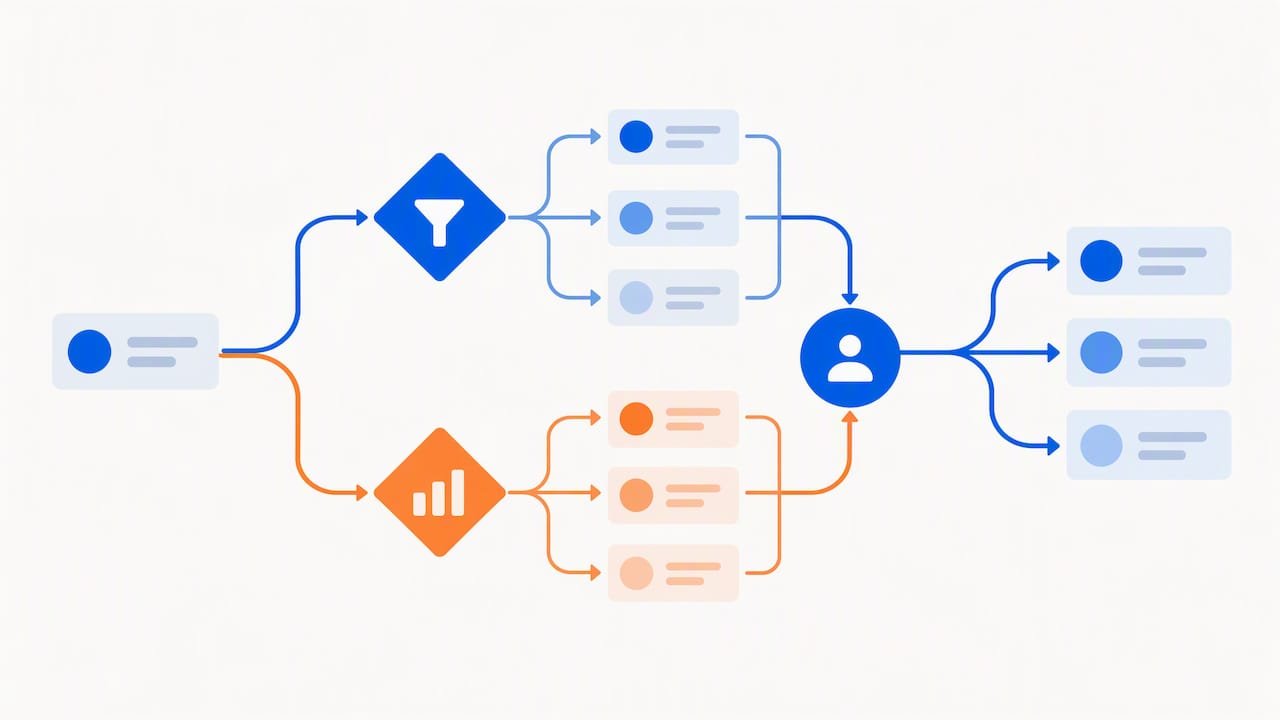
The sensible way to add this is in stages. First, make sure rule-based routing is stable and your data is clean, because a model trained on messy records learns the mess. Next, introduce the score as one input among several rather than a replacement for rules, so a human can still explain any assignment. Finally, compare outcomes for scored and unscored routing before widening the scope.
Advanced analytics earns its keep in the feedback loop. When you can see conversion by score band and by route, you learn where the model helps and where a simple rule performs just as well. We design this kind of governed analytics for revenue teams through our AI-enabled analytics work, with explainability built in so operations teams can audit every decision.
Keep a human override and a log of model-driven assignments. If a score drifts as your market or product changes, the log shows it early, before reps lose trust in the system.
What role do open-source tools play in lead routing?
Open-source tools give revenue teams a way to build routing logic they can fully inspect and change. Instead of relying on a closed rule engine, you can read the code, adapt it to an unusual territory structure, and avoid being locked into one vendor’s pricing or roadmap.
The benefits are practical. Transparency means your team can see exactly why a lead went where it did. Flexibility lets you add custom matching logic, such as a proprietary account hierarchy, that packaged tools may not support. Portability lets you move the logic between systems as your stack changes, because the rules live in your own repository rather than inside someone else’s interface.
Open source also asks something of you. Your team owns hosting, updates and monitoring, so it suits organizations with engineering support or a partner who provides it. Pair open-source routing code with a managed integration layer for your CRM, and with the same data hygiene and monitoring habits described above.
This is how we approach it: open builds with full visibility into how each agent and workflow behaves, connected to platforms such as Salesforce and HubSpot. If you want to weigh a custom build against a managed option, our page on managed AI agents versus a custom build lays out the trade-offs.
What do ROI and business impact look like in practice?
The honest answer is that results depend on your starting point, so the most useful examples are structured the same way every time: a baseline, a change, and a measured difference.
Consider an illustrative scenario. Say a team receives inbound leads that sit in a shared queue until a manager sorts them each morning. Before automation, first contact averages many hours. The team adds enrichment on capture, account-based and territory rules, and a fallback queue. After a pilot, you would expect to compare three things against the old process: time to first contact, the share of leads reassigned by hand, and the conversion rate from lead to opportunity. The value lies in the difference between those pairs, not in any single number.
To build your own case, measure before you change anything. Record current speed-to-lead, misroute rate and conversion by owner for a few weeks. Then run the pilot against a matched group and report the gap. A credible business case also counts the time operations staff no longer spend triaging.
We publish examples of client outcomes in our case studies. Read them for the structure of the reporting as much as for the results, and copy that structure for your own pilot.
How do real-time data and intent prediction change routing decisions?
Static rules treat every lead from the same segment identically. Real-time data lets routing react to what a person is doing right now: a pricing page visit, a repeat session, a demo request, or a reply to an email. Those signals are strong clues about readiness, and they decay quickly, which is why timing matters.
Customer intent prediction goes a step further. By combining behaviour on your site, enrichment data and past conversion patterns, a model can estimate how close a lead is to buying and route accordingly. A lead showing strong intent can go straight to a rep for an immediate call, while an early-stage visitor moves into a nurture track instead of consuming sales time. Our readers who want to build that nurture path may find this guide on converting leads through a nurture system a helpful companion.
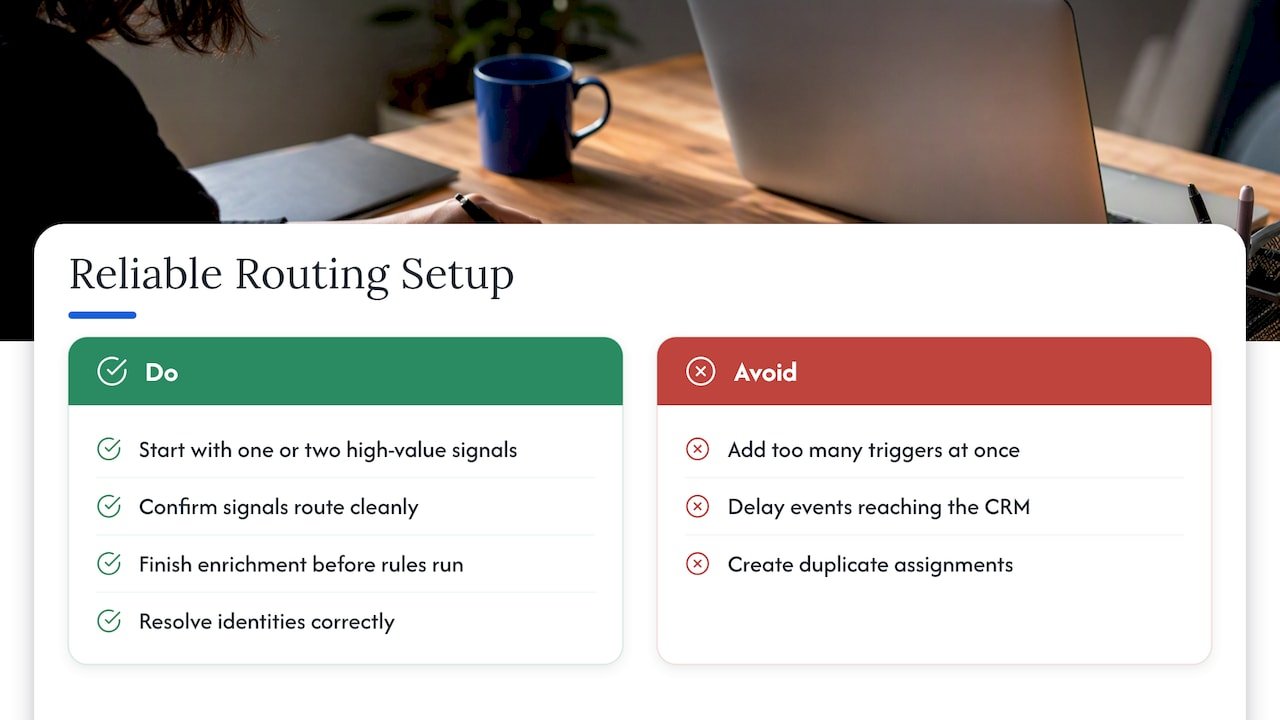
Real-time routing raises the stakes on reliability. Events must reach the CRM quickly, enrichment must finish before the rules run, and identities must resolve correctly so a signal attaches to the right person. Start with one or two high-value signals, such as a demo request, and confirm they route cleanly before adding more. Too many triggers at once create noise, duplicate assignments and rep fatigue.
What security and compliance rules apply to automated routing?
Routing moves personal data between systems, so it falls under the same privacy duties as the rest of your marketing and sales stack. The specific rules depend on where your contacts live and which regulations cover them, so confirm the details with your legal or privacy team rather than assuming one framework applies everywhere.
Several habits hold up across most frameworks. Collect only the fields routing needs, since every extra field is extra exposure. Record consent and its source on the lead, and make sure routing respects opt-outs, so a contact who has unsubscribed is not pushed into an outreach queue. Limit who can edit routing rules and view lead data, using role-based access, and keep an audit log of rule changes and reassignments.
Enrichment adds its own questions. Check how your data providers source their information and whether your use fits their terms. When an automated system, particularly one using AI, makes or influences assignments, keep a log of what it decided and why, so you can explain a decision if a contact or regulator asks.
Governance for agentic systems is part of what we help clients build, including guardrails around what an automated agent may change. Our overview of agentic AI enablement describes how we approach controls from the start rather than adding them afterward.
How to scope a pilot that proves ROI
In our view, the common mistake is ambition: teams try to automate every method, segment and region at once, then cannot tell what worked. Pick one routing method and one measurable SLA, fix the data fields that method depends on, and shadow-validate the decisions before they go live. A narrow pilot with a clear result earns the budget and trust for the broader rollout, while a sprawling one earns arguments about attribution.
— Don
Plan your pilot with Brainiac Consulting
If you would rather start with a tested plan than a blank workflow canvas, we can help you get from scoping to a working pilot. We design pilots, build enrichment on capture, and set up the CRM workflows and governance that keep automated routing reliable. Our team can help with:
- Pilot design with clear success metrics and a shadow-testing plan.
- Enrichment on capture and lead-to-account matching.
- CRM workflow builds, with guardrails for agentic AI in revenue operations.
- Ongoing monitoring after launch.
The simplest next step is a scoping conversation about your current routing and data. Start with our marketing operations optimization and support page, or reach us through Brainiac Consulting to book an assessment.
FAQ
What is the best lead routing software for Salesforce?
The best fit depends on your routing method, team size and data quality, so match tools to your needs rather than to a ranking. Look for support for lead-to-account matching, round-robin and territory rules, and clear audit logs. Reviews on Gartner and G2 show what practitioners expect from automation platforms.
How do you automate lead generation?
Lead generation automation connects capture forms, enrichment and follow-up so no step needs manual handling. Capture the lead, enrich the record, score or flag it, then route it and trigger a task or nurture sequence. Start with one source and one workflow, confirm it runs cleanly, and add sources afterward.
What is a lead automation system?
A lead automation system is a set of connected tools and rules that moves a lead from first touch to the right owner without manual work. It typically covers capture, enrichment, scoring, routing and follow-up. Its quality depends heavily on the cleanliness of the CRM data it reads.
Which CRM is best for lead management?
No single CRM wins for every team. Choose by how well it supports your routing method, integrates with your enrichment and marketing tools, and lets operations staff audit assignments. Salesforce and HubSpot are widely used, and the right one depends on your sales process and who will maintain the rules.