

CRM deduplication means matching records that represent the same person or company, deciding which fields survive, and merging the rest into one traceable record. The safest pattern layers deterministic matching first, adds fuzzy matching for near misses, pilots every merge rule in a sandbox, and keeps a full audit trail with rollback. Done right, you end up with one golden record per contact or account, complete history intact, and nothing you can’t reverse.
TL;DR:
- Exact match rules like email or ID are suitable for automatic merging, but fuzzy matching for names and companies requires human review queues.
- Attribute-level survivorship rules tailored to each data field improve accuracy, with sequence ordering of parent and child records critical to prevent orphaning.
- Running thorough testing, sandbox pilots, and maintaining detailed audit logs are essential to prevent faulty merges and ensure process governance.
- External tools are necessary for managing duplicates across multiple systems, especially when native CRM features are limited or reappearing after cleanup.
- Ongoing metrics like duplicate rate, merge reversals, and review queue speed are vital to monitor long-term success and effectiveness of deduplication controls.
Table of Contents
- What is the best approach to CRM deduplication matching?
- How do you design survivorship rules for merged records?
- How do you stop CRM duplicates before they happen?
- When do native duplicate rules stop being enough?
- How does Brainiac approach governed CRM deduplication?
- What’s your pre-merge, merge, and post-merge checklist?
- What does a full deduplication workflow look like in practice?
- Which tools go beyond native CRM deduplication features?
- What are the most common CRM deduplication mistakes?
- How do you measure whether deduplication is working?
- Why governance matters more than the matching algorithm
- How can Brainiac support a large-scale deduplication project?
- Sources
What is the best approach to CRM deduplication matching?
Start with deterministic matching. If two records share an exact email address, a canonical phone number, or a unique government or tax ID, you can merge with near-total confidence. This is the layer that does most of the heavy lifting with the least risk, and it’s why Salesforce pairs matching rules with duplicate rules, letting admins combine up to three matching rules per duplicate rule and up to five active matching rules per object.
Fuzzy matching picks up what exact matching misses: “Bob Smith” versus “Robert Smith,” “Acme Corp.” versus “Acme Corporation,” a transposed digit in a phone number. Algorithms like Levenshtein distance and Soundex handle name variants well; token-based matching works better for company names with suffixes and abbreviations. CiviCRM’s documentation on weighted-field dedupe rules illustrates the principle: run a strict rule first to catch obvious duplicates, then a broader rule to surface probable ones, so you don’t miss matches while still controlling false positives.
Before either layer runs, normalize the data. Strip punctuation from phone numbers, standardize company suffixes (“Inc.,” “Incorporated,” and “Inc” should collapse to one form), and lowercase email addresses for comparison. Sloppy normalization is the single biggest cause of missed duplicates we see in CRM audits.
Pro Tip: Build your match keys before you build your rules. A match key that concatenates normalized last name, normalized company, and area code catches far more duplicates than five separate field comparisons run independently.
Not every match belongs on autopilot. A useful framework is to auto-merge only the highest-confidence deterministic hits and route mid-confidence fuzzy matches to a review queue with an owner and a service-level agreement.
- Exact email or unique ID match: auto-merge
- Fuzzy name and company match above a high threshold: auto-merge with logging
- Fuzzy match below that threshold: human review queue
- Conflicting source systems on key fields: always route to review
HubSpot handles part of this automatically. It deduplicates contacts by email and companies by domain name out of the box, which is convenient but narrow: anything outside those two fields still needs a rule you build yourself.
How do you design survivorship rules for merged records?
Survivorship should be decided field by field, not record by record. Treating one record as the “winner” for every attribute is a common mistake. Instead, apply rules by field type, since the same contact might have a more accurate email in one source system and a more current job title in another.
Four survivorship rule types cover most cases:
- Source priority — a designated system of record wins for a given field (your ERP wins on billing address, your marketing platform wins on lead source).
- Most recent — the value with the latest update timestamp wins, useful for fields like job title or phone number that change over time.
- Most complete — the record with a populated value beats one with a blank field, regardless of recency.
- Conditional or hybrid — combine rules, such as “most recent unless the source is marked untrusted.”
Attribute-level survivorship is safer than whole-record survivorship because it lets you document, field by field, exactly why a value won, which matters enormously the first time someone questions why a customer’s address changed.
Sequencing matters just as much as the survivorship logic itself. Merge parent objects, accounts, and companies before you touch their children, contacts, deals, and activities. Reparent every related child record to the surviving parent first, then merge or delete. Merging out of order is the fastest way to orphan a deal or lose a support ticket’s history, and it’s largely irreversible once related records get deleted rather than reparented.
Pro Tip: Run your first ten parent-child merges in a sandbox and export a snapshot of both records beforehand. Comparing the snapshot against the merged result is the only reliable way to catch a survivorship rule that’s quietly dropping data.
Every merge, especially at volume, needs an approval step and a logged audit trail: who approved it, which rule fired, and what the pre-merge state looked like. High-impact merges (major accounts, records with substantial deal history) deserve a defined rollback window, typically 30 to 90 days, during which you can reverse the merge if something looks wrong. Pilot the whole process on a limited sample with human review before letting any rule run unattended.
How do you stop CRM duplicates before they happen?
Cleanup projects fix the past. Controls fix the future, and they matter more, because a CRM without prevention will re-accumulate duplicates within months of a clean sweep. Three layers work together here.
Real-time checks catch duplicates at the point of entry. Salesforce’s duplicate rules can block record creation outright or simply alert the user, giving admins a choice between hard enforcement and a softer nudge. Where your platform supports it, enforce unique-value constraints on identity fields like email or tax ID so a duplicate literally cannot save.
Import-time discipline prevents the second-biggest source of new duplicates: bulk uploads from events, list purchases, or migrated spreadsheets.
- Always include the Record ID or a stable unique identifier in export and re-import files.
- Normalize incoming files (trim whitespace, standardize casing) before they ever touch the CRM.
- Run matching logic against the import batch before it lands, not after.
- Reject or flag rows missing a required identity field rather than letting them create orphan records.
A cross-team data contract closes the gap that tools alone can’t. Sales, marketing, and finance often each treat a different field as the canonical identity key, which is how duplicates creep back in even with good rules running. Agree on which field is canonical, what format it takes, and who owns changes to the matching logic. Track a duplicate rate by object and by source system on a recurring dashboard, and review it monthly, not annually.
When do native duplicate rules stop being enough?
Every major CRM ships with some duplicate detection.
Native strengths are real: exact-match detection, in-app alerts at the point of entry, and unique-field enforcement cover a lot of ground with zero extra spend. Their limits show up predictably:
- Merge caps that block bulk cleanup projects (some platforms limit how many records you can merge in one action).
- Weak or absent fuzzy matching, so name and company variants slip through.
- Advanced matching rules gated behind higher-tier editions.
- No native way to deduplicate across separate systems, so a contact clean in your CRM might still exist three times across your marketing platform and your data warehouse.
Consider external tooling when you’re managing duplicates across multiple source systems, when the same duplicates keep reappearing after native rules run, or when you need continuous, cross-platform matching rather than a periodic cleanup. Openprise is one example of a platform built for exactly this: continuous, cross-system deduplication using fuzzy matching and survivorship logic across CRM, marketing automation, and data warehouse layers simultaneously. Whatever tool you evaluate, validate it the same way: pilot on a sample, confirm rollback works, and check that it produces a real audit log before trusting it at scale.
How does Brainiac approach governed CRM deduplication?
Brainiacconsulting treats deduplication as an operations problem, not a one-time script. Our open-source methodology and integrations with platforms like Salesforce and HubSpot mean every matching rule, survivorship decision, and merge log stays visible across the systems that touch your customer data, rather than locked inside a single vendor’s black box.
The organizations that get burned by deduplication almost never lose to a bad matching algorithm. They lose to a merge nobody could trace back and reverse. Observability is the difference between a controlled cleanup and a support ticket nobody can explain three weeks later.
We build CRM workflow observability into every managed engagement: logs, alerts, named owners, and recovery paths on every automated merge. Before any AI-assisted matching model runs at scale, we pilot it against a sample with a human review queue and a defined rollback window, the same governance discipline covered above, applied with the tooling to enforce it consistently.
What’s your pre-merge, merge, and post-merge checklist?
Run this sequence for any deduplication project, from a one-time cleanup to an ongoing weekly job.
- Pre-merge: back up the full dataset, take a sandbox snapshot, test your matching rules there, and finalize survivorship rules in writing before touching production.
- Merge: resolve parent records first, reparent every related child record, execute the merge, and log who approved it and which rule fired.
- Post-merge: validate a sample of merged records against your snapshot, monitor the duplicate rate for a rebound, and update your data contract if a gap caused the duplicates in the first place.
| Stage | Primary risk | Control |
|---|---|---|
| Pre-merge | Untested survivorship rule | Sandbox pilot with snapshot comparison |
| Merge | Orphaned child records | Parent-before-child sequencing |
| Post-merge | Duplicate rate rebounds | Scheduled audit and dashboard tracking |
What does a full deduplication workflow look like in practice?
A working deduplication project moves through four stages, and skipping any one of them is where most projects go wrong.
Data preparation comes first. Export the object you’re targeting, whether contacts, accounts, or leads, and normalize it: standardize phone formats, collapse company suffixes, trim whitespace, and flag records missing a usable identity field.
Matching runs next, in two passes. Pass one applies deterministic rules against email, phone, or unique IDs and flags high-confidence pairs. Pass two applies fuzzy matching against names and company fields, scoring each pair against your threshold and routing mid-confidence results to a review queue rather than auto-merging them.
Merging follows a fixed sequence: resolve parent objects first, reparent every child record (deals, activities, cases) to the surviving parent, apply your attribute-level survivorship rules field by field, then execute the merge with logging turned on for every action.
Validation closes the loop. Pull a sample of merged records and compare them against your pre-merge snapshot to confirm no field silently dropped, check that related records (open deals, support cases, email history) reattached correctly, and rerun your matching logic against the cleaned dataset to confirm the duplicate count actually fell. Skip this step and you won’t know whether the project worked until a salesperson complains that a deal disappeared.
Which tools go beyond native CRM deduplication features?
Native duplicate rules cover single-system cleanup well. Once you’re managing identity across a marketing platform, a data warehouse, and a CRM simultaneously, a different category of tool becomes worth evaluating.
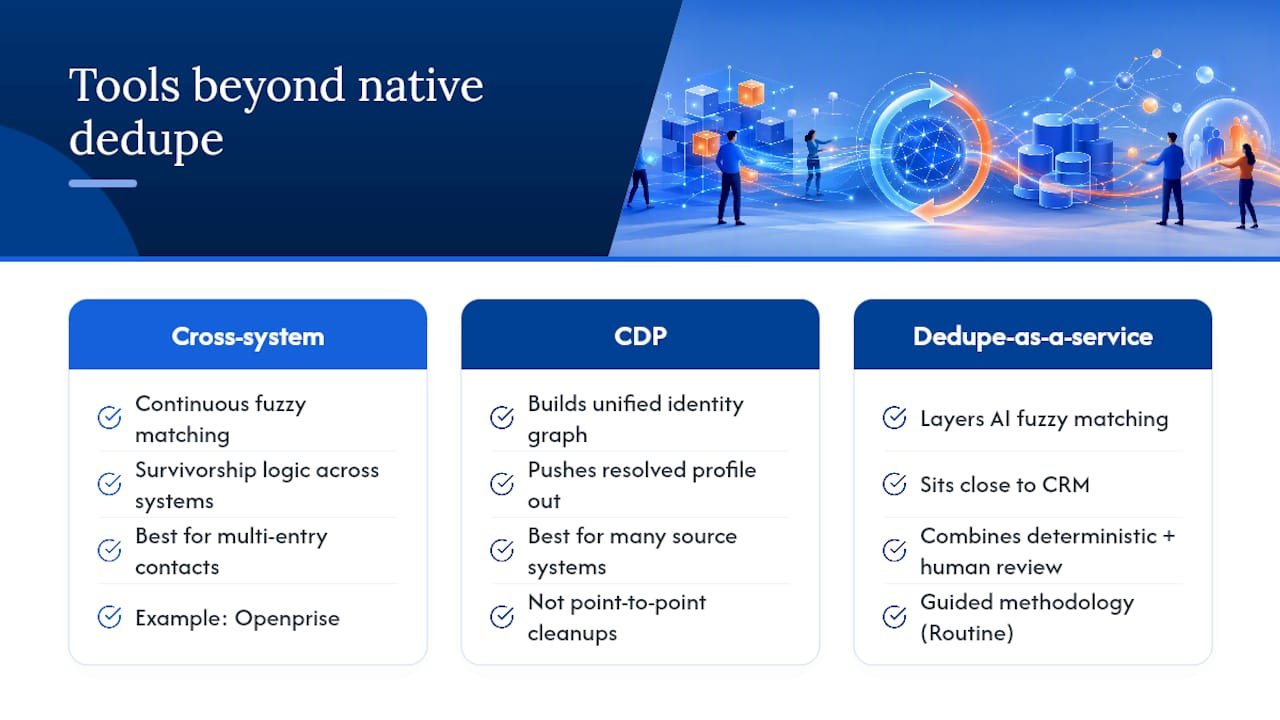
Data automation and cross-system platforms like Openprise run continuous fuzzy matching and survivorship logic across CRM, marketing automation, and warehouse data at once, rather than treating each system as its own island. This matters most for organizations where the same contact enters through a webform, a trade show list, and a support ticket, each landing in a different system with slightly different formatting.
Customer data platforms (CDPs) take a related but distinct approach: they build a unified identity graph across every system that touches a customer, then push a resolved, deduplicated profile back out. This suits organizations with many source systems and a genuine need for one identity layer, rather than a series of point-to-point cleanups.
Specialized dedupe-as-a-service tools sit closer to the CRM itself, often layering AI-assisted fuzzy matching on top of native rules without replacing them. Routine’s guidance on combining deterministic matching, fuzzy logic, and human review queues describes the methodology most of these tools are built around.
Whichever category you evaluate, the validation steps don’t change: pilot on a small, representative sample, confirm the tool produces a real audit log, and check that a bad merge can be rolled back before you ever point it at your full production dataset.
What are the most common CRM deduplication mistakes?
Most deduplication projects fail for a handful of predictable reasons, and nearly all of them are governance failures rather than technical ones.
Merging in the wrong order tops the list. Merging a child contact before resolving its parent account, or deleting a losing record instead of reparenting its deals and activities first, is how revenue history quietly disappears. Sequencing parent objects before children isn’t optional, it’s the single control that prevents orphaned records.
Treating survivorship as all-or-nothing causes the second most common problem. Picking one record as the overall “winner” instead of deciding field by field means you inevitably overwrite a good value with a stale one somewhere in the record.
Running fuzzy matching with no review queue produces false-positive merges that combine two genuinely different customers. A mid-confidence match needs a human, a queue, and an owner, not an automatic merge.
Skipping the sandbox pilot is how a bad rule reaches production at scale instead of failing safely on ten test records first.
Treating cleanup as a one-time event guarantees the duplicate count creeps back up within months, because nobody fixed the import process, the missing unique-field enforcement, or the cross-team disagreement over which field is the canonical identity key. Prevention controls, not periodic cleanups, are what keep a duplicate rate low long-term.
How do you measure whether deduplication is working?
A deduplication project without metrics is just a guess about whether it helped. Track a small set of numbers before, during, and after any cleanup, and keep watching them afterward.
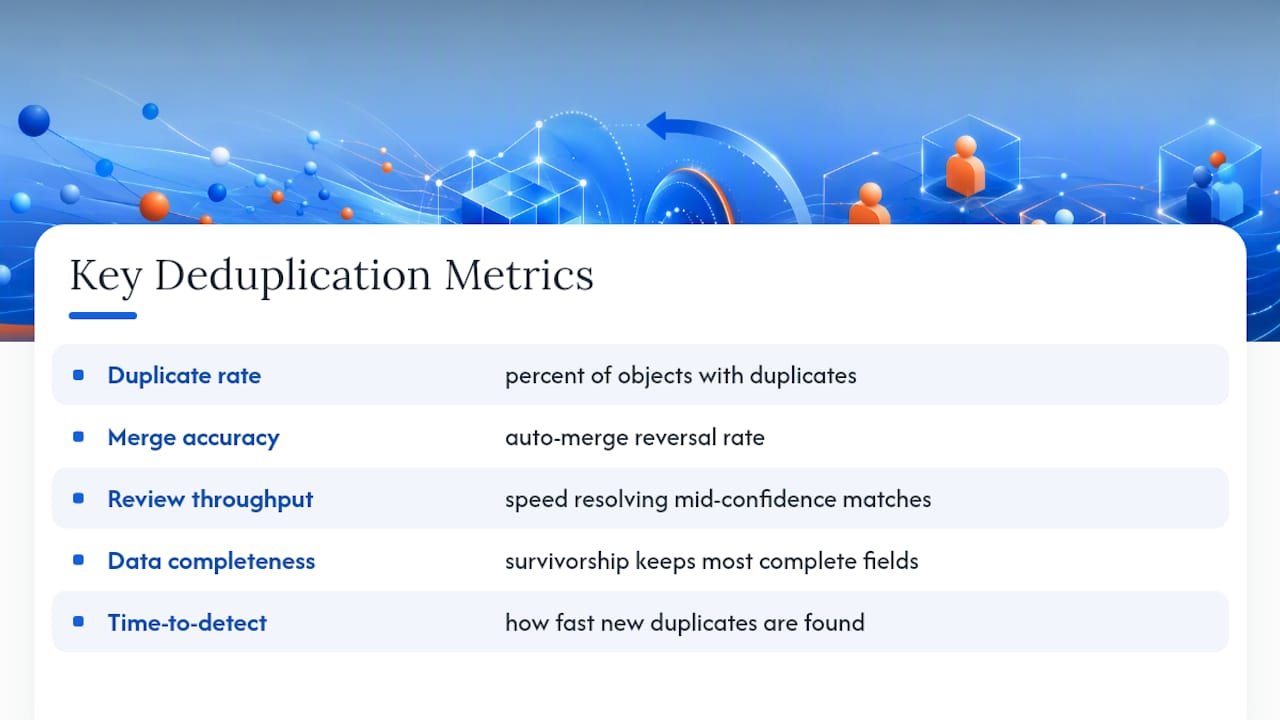
Duplicate rate by object is the core metric: what percentage of contacts, accounts, or leads have at least one known duplicate. Segment it by source system, since a duplicate rate that’s fine overall but spiking from one integration points you straight at the fix.
Merge accuracy tracks how many auto-merges get flagged or reversed during your rollback window. A rising reversal rate means your confidence threshold is set too aggressively.
Review queue throughput measures how quickly mid-confidence fuzzy matches get resolved by a human reviewer. A queue that backs up defeats the purpose of routing matches there in the first place.
Data completeness post-merge checks whether survivorship rules are actually preserving the most complete, most accurate field values, not just picking a winner arbitrarily.
Time-to-detect for new duplicates tells you whether your prevention controls, real-time checks and import-time matching, are catching problems at the source rather than letting them accumulate for the next cleanup cycle.
Review these on a recurring dashboard, monthly at minimum, rather than only during a dedicated cleanup project. A duplicate rate that stays flat between projects is the clearest sign your prevention controls, not just your merge logic, are actually working.
Why governance matters more than the matching algorithm
The conventional advice on CRM deduplication spends most of its energy on which matching algorithm catches the cleverest near-miss. That’s the wrong emphasis. The projects that go badly wrong almost never fail because a fuzzy-match algorithm missed a variant spelling. They fail because a merge ran in the wrong sequence, a survivorship rule silently dropped a field nobody double-checked, or nobody could explain three weeks later why a customer’s deal history disappeared.
Prioritize the boring parts first: sandbox pilots before production runs, attribute-level survivorship decided in writing, parent-before-child sequencing enforced every time, and an audit trail that lets you answer “why did this happen” without guessing. Tooling matters, but only after the governance is solid. An enterprise-grade matching engine bolted onto a process with no rollback window and no review queue will still produce merges nobody can trust.
If there’s one thing worth changing about how most teams run this today, it’s sequencing the governance work before the tool selection, not after.
— Don
How can Brainiac support a large-scale deduplication project?
If you’re facing deduplication across multiple source systems, high-stakes merges on major accounts, or the need for AI-assisted matching with real governance behind it, that’s where a managed partner earns its cost. Brainiacconsulting’s Atlas AI operations platform runs matching pilots on a limited sample first, with human review queues and a rollback window built into every automated merge, not bolted on afterward.

Our managed AI agents handle the ongoing observability work, tracking merge logs, flagging anomalies, and giving you an owner for every exception, so deduplication stops being a quarterly fire drill and becomes a controlled, monitored process. Teams weighing whether to build this internally or bring in a managed partner can also read our comparison of managed AI agents versus custom build before deciding.
Engage us when the risk of a bad merge, an orphaned deal, a lost support history, outweighs the cost of doing it right. Book a working session on Atlas AI operations to scope a pilot merge on your own data before committing to anything at scale.
Sources
- Resolve and Prevent Duplicate Data in Salesforce — Trailhead
- Deduplicate records in HubSpot — HubSpot Knowledge Base
- How to Deduplicate Your CRM With AI Matching, Fuzzy Logic, and Merge Rules — Routine