
Marketo AI integration comes in two forms: the native AI features Adobe builds into Marketo Engage, and external AI tools or agents you connect to your instance through its APIs and MCP server. Most teams need both, in a sensible order: clean the data, wire up access with least-privilege credentials, start with one narrow workflow, and measure it before you expand. This guide walks through each step, from our point of view as a team that builds and operates these systems for marketing operations groups.
TL;DR
- Native options include generative authoring, agentic workflows inside Smart Campaigns, and a natural-language assistant for operational tasks. External options connect through MCP and the REST API.
- Connecting external AI requires a REST-enabled instance, an admin to create credentials in LaunchPoint, and a dedicated API-only user with a narrow role.
- The best first workflows fix data quality: title and company normalization, phone formatting, and bot-click flagging. Scoring, routing and attribution all depend on those fields.
- Test in a sandbox or on a small segment, keep humans on approvals, and track a baseline metric before and after each workflow.
- Attribution needs its own data foundation. AI can speed up the reporting, but it cannot repair missing touchpoints.
Table of Contents
- What “AI integration” means in Marketo Engage
- What you need before you connect anything
- Putting agents inside Smart Campaigns
- Workflows worth building first
- Reporting, real-time insight and attribution
- Testing, governance and measurement
- Our perspective
- How we can help
- FAQ
- Sources
What “AI integration” means in Marketo Engage
When people search for this topic they usually mean one of three things, and the answer to each is different.
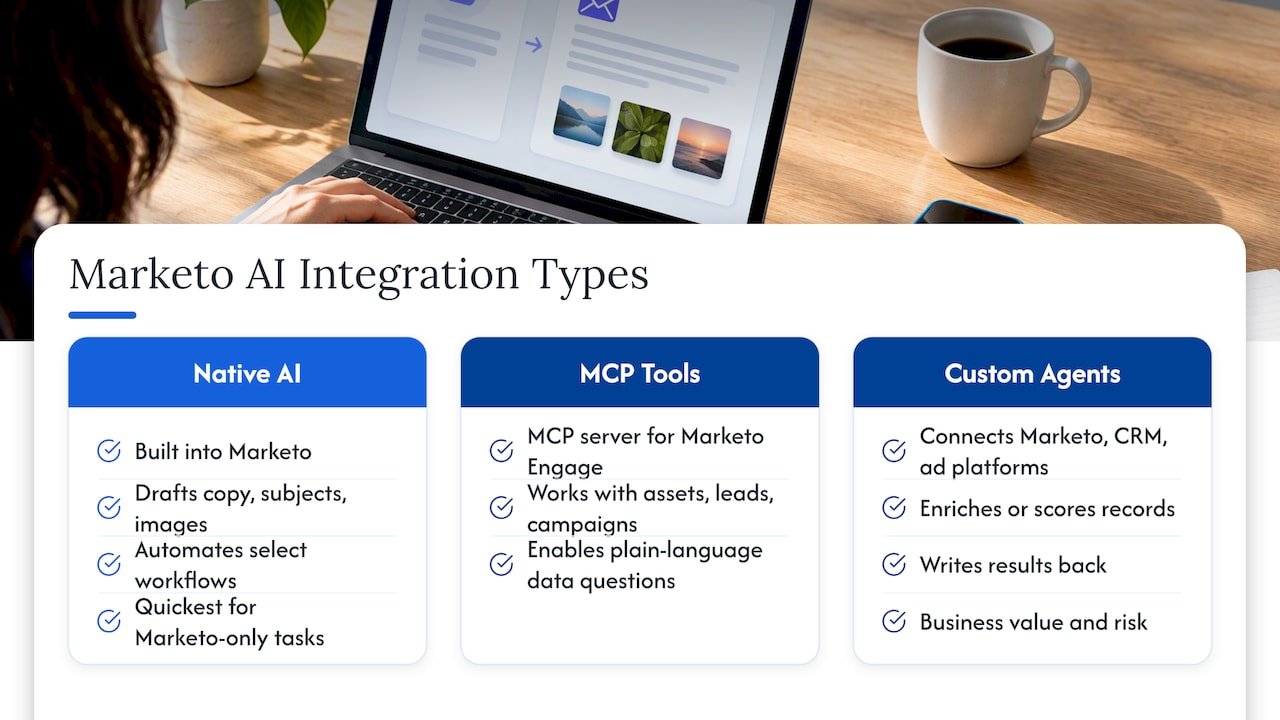
Native AI inside Marketo. Adobe ships AI features within the product. Generative AI authoring can create email copy, subject lines, images and more. A native agentic assistant, CX Enterprise Coworker for Marketo Engage, automates select workflows through natural-language interaction, including lead import, program validation, data normalization and lead investigation.
AI tools connected from outside. Adobe documents an MCP server for Marketo Engage that lets AI tools work with asset management, lead data and campaign automation. This is the route for custom agents, internal copilots and analysts who want to ask questions of Marketo data in plain language.
Custom agents and analytics that sit around Marketo. These pull from Marketo, your CRM and your ad platforms, enrich or score records, and write results back. This is the layer where most of the business value, and most of the risk, lives.
A useful way to choose: native features are quickest for tasks that live entirely inside Marketo, such as drafting copy or cleaning fields. External connections win when the task needs data from other systems, your own business rules, or an audit trail you control.
What you need before you connect anything
The technical prerequisites are modest, but they involve people who do not always sit in the same room: a Marketo admin, someone who owns security, and whoever owns the AI tool.
According to Adobe’s documentation, connecting AI tools through MCP requires a REST-enabled Marketo instance, admin access to create API credentials in LaunchPoint, a dedicated API user, and a Client ID, Client Secret and Munchkin Account ID. The instance also has to be enabled for MCP access.
A pre-flight checklist
- Create a dedicated API-only user. Never reuse a named person’s login. Give the role only the permissions the workflow needs.
- Decide read versus write. An agent that only reads lead data is a very different risk from one that can change lead records or activate campaigns. Start read-only where you can.
- Document the fields it touches. List each lead field the agent reads or writes, and who owns it.
- Check data privacy obligations. If you hold California resident data, map where AI tools receive personal information. Our CCPA checklist for marketers covers the martech data mapping.
- Agree on a rollback. Know how you will revert bulk changes before the first run.
On security, Adobe describes MCP connections as relying on a dedicated API-only user with least-privilege role permissions, per-request credential transmission without server-side storage, and multi-tenant isolation. Least privilege is the part you control, so spend your time there.
If your team is also building direct API integrations, our Marketo API reference guide covers authentication, limits and common patterns. For the wider integration picture, including CRM sync, the Marketo integration checklist is a good companion.
Putting agents inside Smart Campaigns
Smart Campaigns are where Marketo decisions happen: who enters, how they are scored, where they route. That makes them the natural home for AI that evaluates or transforms a lead as it moves.
Adobe describes AI-powered callable agents that are invoked as workflow steps within Smart Campaigns to evaluate or transform lead data. As leads move through a campaign, the agents standardize data, identify suspicious activity and prepare accurate inputs before the next action. The same page lists out-of-the-box templates for job title standardization, company name normalization, phone number formatting and flagging click activity that may come from security scanners. Teams with their own normalization logic can deploy it as a custom callable agent.
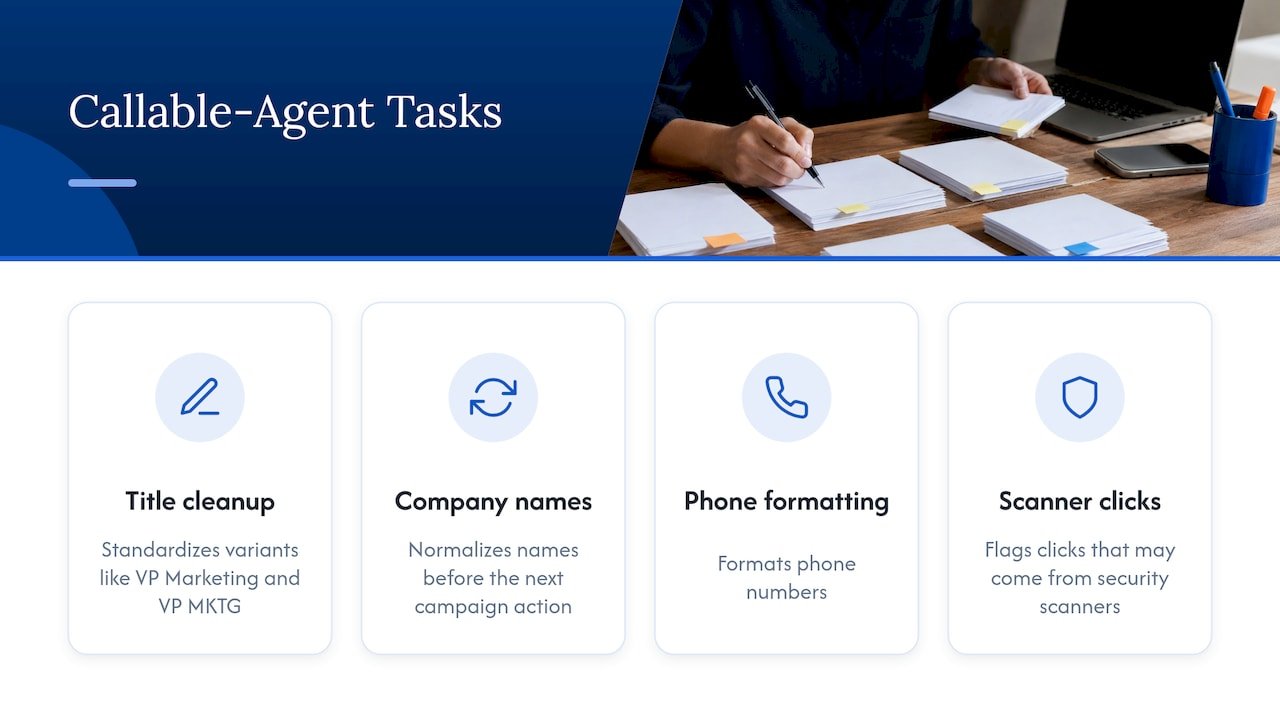
Why this matters: one person types “VP Marketing” and another types “VP MKTG”. A human knows they are the same. A scoring model or a routing rule may not, and a lead can land in the wrong queue or miss a segment entirely.
Where we would place agents in a flow
| Position in the flow | What the agent does | Why there |
|---|---|---|
| Right after lead creation | Normalizes title, company and phone | Fixes fields before any rule reads them |
| Before scoring | Flags suspicious clicks and bot activity | Keeps scanner clicks out of engagement scores |
| Before routing | Validates required fields and territory inputs | Prevents misrouted leads and lost response time |
| After a form fill | Triggers enrichment and writes back results | Gives sales context at the moment of intent |
The principle is simple: put the check one step before the decision that depends on it, not at the end of the pipeline.
Workflows worth building first
From our work with marketing operations teams, the strongest early candidates share three traits: the task is repetitive, the correct answer is checkable, and a mistake is easy to reverse.
Data normalization and validation
This is the lowest-risk starting point. Native agents or a custom one standardize titles, companies and phone formats. The result shows up quickly in cleaner segmentation and fewer routing exceptions. Adobe’s own assistant lists data normalization and program validation among its supported tasks, so you can compare a native approach with a custom one before committing to either.
Lead enrichment and qualification
Enrichment fills gaps: company size, industry, buying role. Qualification then uses those fields, along with behaviour, to decide whether a lead is ready for sales. Done well, sales sees a short, reasoned summary instead of a raw record. Done badly, an agent invents attributes. That is why we recommend a staged rollout in which the agent’s output is compared with a human-reviewed sample first. We lay out the stages in our guide to AI lead enrichment for B2B go-to-market teams.
Personalization
Generative authoring speeds up first drafts of email copy and subject lines, and dynamic content ties variants to segments. The quality of personalization still depends on the segments and fields underneath, which is the reason to fix data first. Our whitepaper on optimizing Marketo personalization goes deeper, and the lead nurturing whitepaper shows how nurture design connects to conversion.
Operational investigation
Questions like “why did this lead not receive the nurture email?” usually cost an ops person twenty minutes of clicking through activity logs. A natural-language assistant or an MCP-connected agent can trace it and summarize the cause. This is read-heavy work, so the risk is low and the time saved is easy to see.
Reporting, real-time insight and attribution
AI adds the most value to reporting when the underlying touchpoints are complete and consistent. Where they are not, AI produces confident answers built on gaps.
For B2B attribution within the Adobe ecosystem, Marketo Measure is described as providing every-touch B2B attribution powered by Attribution AI. If you are deciding how to implement and tune it, our Marketo Measure (Bizible) service page explains how we approach it, and account-based attribution shows how to credit revenue to accounts rather than only to individual contacts.
A few practical points:
- Treat attribution as a map, not a courtroom verdict. It shows which routes customers travel and where influence concentrates. It does not prove one touchpoint caused a sale. We unpack that in what marketers get wrong about attribution.
- Agree on definitions first. Pipeline, sourced, influenced and stage dates must mean the same thing in Marketo, your CRM and your dashboards.
- Connect reporting to decisions. Analytics that lead to budget moves repay the effort. A broader look at analytics-driven marketing ROI makes the case for building that discipline.
On latency, one practitioner publication notes that data streams can replace batch API polling for activity data, which removes API call overhead and delay for analytics. If your dashboards lag behind campaigns, it is worth evaluating with your Marketo admin.
For teams that want a governed way to ask questions of this data, see our AI analytics platform and self-serve analytics for leaders.
Testing, governance and measurement
An AI workflow that touches live leads needs the same discipline as any production change.
Keep humans in control of decisions that matter
Adobe frames agentic AI in Marketo Engage as an orchestrator that operates within defined guardrails while humans stay in control of strategy and approvals. We agree with that stance, and it translates into concrete rules: agents may standardize, flag and recommend; people approve budget, audience definitions and anything customer-facing that is new.
A simple test plan
- Baseline. Record the metric the workflow should move: routing exceptions, enrichment fill rate, speed to first touch, MQL-to-SQL rate.
- Shadow run. Let the agent propose changes without writing them. Compare its output with a human-reviewed sample.
- Limited release. Apply it to a small segment or a single program for a fixed period.
- Review failures. Look at wrong outputs, not only averages. Edge cases such as unusual job titles or non-US phone formats reveal weaknesses.
- Expand deliberately. Widen scope only when the error rate is acceptable to the people who own the outcome.
Our approach to this staged method is described on the enterprise AI agent deployment page, which covers shadow validation and governance.
Risks to plan for
- Over-broad permissions. Give each agent its own API user and a narrow role.
- Silent drift. Models and data change. Schedule periodic spot checks of outputs.
- Unowned fields. If two systems write the same field, an agent can start a tug of war with your CRM sync.
- Privacy. Know which personal data leaves Marketo, and where it goes.
Our perspective
We see the same pattern in nearly every Marketo environment: the AI conversation starts with copy generation and ends, a few months later, with a data quality problem. The teams that get lasting value start at the other end. They fix the fields that scoring, routing and attribution depend on, and then they add intelligence on top.
Our view is that an AI agent should be built the way you would build any member of the operations team: with a clear job, limited access, a manager, and a record of its work. That is why we favour open-source builds and deployments that run inside your own environment, so you can see what an agent did and why. No black boxes means your ops lead can read the logic, challenge it and change it.
We also think Marketo should not be treated as an island. Value shows up when Marketo, Salesforce or HubSpot, and your analytics layer share the same definitions. Our work spans agent design, Marketo implementation, and attribution, so the pieces are planned together rather than bolted on in sequence.
Don
How we can help
If you want to move from experiments to a workflow that runs reliably, we design, deploy and operate AI agents and analytics around Marketo. Depending on where you are, that could begin with an AI readiness assessment and roadmap, continue with custom agent deployment, and be supported by Marketo consulting for implementation and ongoing operations.
To size a build before you talk to anyone, try our AI agent cost calculator. To see how a similar Marketo and Salesforce project played out, read the case study on boosting SQL conversions.
FAQ
Do I need a developer to connect AI to Marketo?
For native features, usually not: a Marketo admin can enable and configure them. For external connections through MCP or the REST API, you need an admin to create credentials in LaunchPoint and someone who can configure the AI tool side. Custom agents that write back to leads benefit from an engineer or consultant who can build in logging and rollback.
Which Marketo AI workflow should we build first?
Start with data normalization: job titles, company names and phone formats. The task is repetitive, the result is checkable, and the benefit carries into scoring, routing and reporting. Lead enrichment is a sensible second step once the fields it feeds are clean.
Is it safe to give an AI agent access to our Marketo instance?
It can be, if you scope access tightly. Use a dedicated API-only user with a least-privilege role, start with read-only access where possible, and keep approvals with people. Adobe’s MCP documentation describes this least-privilege model for connections. Involve your security and privacy owners before the agent touches personal data.
Can AI make Marketo attribution more accurate?
It can speed up modelling and reporting, and tools such as Marketo Measure use AI to support every-touch B2B attribution. Accuracy still depends on complete touchpoint tracking and consistent CRM stage data. Fix those first, and treat the output as a guide to where influence sits rather than proof of cause.
How do we know whether the workflow is working?
Choose one metric before you start, such as routing exceptions, enrichment fill rate or MQL-to-SQL conversion, and compare it with the baseline after a limited release. Review wrong outputs as well as averages, and keep spot-checking after launch.
Sources
- Marketo Engage MCP Server | Adobe Marketo Engage
- CX Enterprise Coworker for Marketo Engage data information
- Agentic AI & Marketing Automation | Adobe Marketo
- Build Campaigns with Agentic Workflows in Marketo Engage
- Marketo Review 2026: Custom Pricing Marketing Automation
- De-Risk Partition Merges With a Wave-Based Testing Strategy
- Why analytics in marketing drives better ROI in 2026