

Campaign influence reporting shows which marketing campaigns touched the opportunities in your pipeline and how much revenue credit each one earns. In Salesforce, it works by linking campaign members to opportunities, applying an attribution model to split the credit, and surfacing the result in reports and dashboards. Set up well, it turns “marketing helped” into a number your sales and finance teams can discuss.
This guide walks through how the association works, which models to choose, how to set it up, which reports to build and where teams commonly trip. Think of attribution as a map rather than a courtroom verdict: it won’t prove a single cause, but it will show you where the traffic runs.
TL;DR
- Campaign influence links campaigns to opportunities through campaign members who hold a contact role, then assigns each campaign a share of the opportunity’s revenue.
- Pick the model first. Primary Campaign Source, first touch, last touch, even distribution and custom models answer different questions.
- Setup is a short checklist: enable the feature, choose a default model, add related lists to page layouts and grant the right permissions.
- Start with the Campaigns with Influenced Opportunities report, then build a dashboard from it.
- Plan for the documented limits, such as no new influence records after an opportunity closes, so your reports stay trustworthy.
Table of Contents
- What campaign influence reporting actually shows
- How campaigns get linked to opportunities
- Choosing an attribution model
- Setting up campaign influence step by step
- Reports and dashboards worth building first
- Limits to plan around
- Where native reporting reaches its edge
- Our perspective
- How Brainiac can help
- FAQ
- Sources
What campaign influence reporting actually shows
Salesforce Campaign Influence is a feature for attributing revenue share to marketing activity by identifying how campaigns affect your opportunity pipeline. The data it exposes includes revenue share, campaign involvement and opportunity details, available through related lists and reports.
The customizable version goes further. It lets you attribute a percentage of success to each influential campaign, using standard or custom attribution models, according to the same Salesforce implementation guide.
In practice, a good influence report answers questions like these:
- Which campaigns were present on the deals that closed this quarter?
- How much pipeline and revenue does each campaign carry under our chosen model?
- Do campaigns that generate leads also help deals progress, or only start them?
- How do results change when we switch from one model to another?
That last question matters more than it looks. Comparing models side by side is how you separate a campaign that opens doors from one that merely shows up late in a deal.
How campaigns get linked to opportunities
Before any model can split credit, Salesforce has to decide which campaigns count as influencers. The logic is straightforward. Salesforce associates a campaign with an opportunity when a campaign member also holds a contact role on that open opportunity. The association can happen automatically, based on the time frame and auto-association rules you configure, or manually through the interface.
Influence records can be created in three ways, per the implementation guide:
- Manually on an opportunity record.
- Automatically through auto-association rules.
- Programmatically through Apex triggers or APIs.
The time frame rule
The time frame is the setting that most often surprises teams. Salesforce’s own explanation of the campaign influence time frame describes the test this way: the gap between the opportunity’s created date and the campaign member’s created date (or first associated date) must be smaller than the time frame you configured.
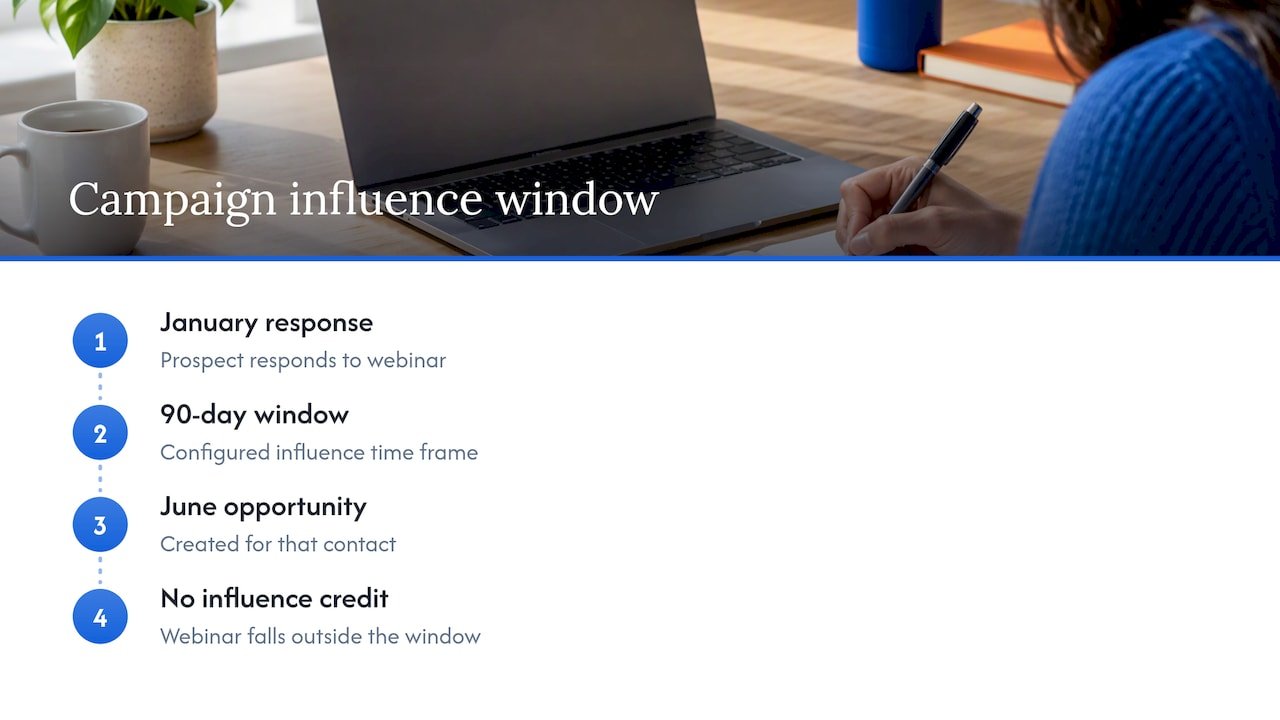
A simple example shows why this matters. Suppose your time frame is 90 days. A prospect responds to a webinar in January, and an opportunity is created for that contact in June. The webinar falls outside the window, so it earns no influence on that deal, even though the prospect may remember it vividly. If your sales cycle runs six months, a 90-day window quietly erases the top of your funnel from your reports.
Set the window to match your real cycle length, not a default. Pull ten recently closed deals, measure the days between first campaign response and opportunity creation, and pick a window that captures most of them.
Choosing an attribution model
Salesforce provides standard models that distribute revenue share by logic such as Primary Campaign Source, first touch, last touch or even distribution. You can also customize the percentages, either by updating them manually or through automated API and Apex triggers, as described in the Salesforce Help overview.
Here is how the main options read in practice:
| Model | How it assigns credit | Best question it answers |
|---|---|---|
| Primary Campaign Source | 100% to the campaign in the opportunity’s Primary Campaign Source field | Which campaign do sales reps say sourced this deal? |
| First touch | Credit to the earliest associated campaign | What starts our deals? |
| Last touch | Credit to the most recent associated campaign | What closes or accelerates them? |
| Even distribution | Equal share across all influencing campaigns | Which campaigns show up repeatedly across deals? |
| Custom | Percentages you define by rule or code | How do we weight the stages that matter to our cycle? |
The Primary Campaign Source model is the default in Customizable Campaign Influence. It assigns 100% influence to the campaign named in the Primary Campaign Source field using auto-association. That makes it easy to start with, but it only reflects what someone typed into one field.
A sensible way to pick
- Start with one default model so every report reads from the same baseline.
- Add a second model for comparison, usually first touch or even distribution, so you can see how much a campaign’s value changes with the lens.
- Move to a custom model once you know which stages of your funnel deserve extra weight, for example demo requests over content downloads.
We go deeper on this choice in how to choose and configure your campaign influence models. For a broader view of how analytics ties to return on spend, this piece on marketing analytics and ROI is a good companion.
Setting up campaign influence step by step
The setup path is short. According to the Salesforce implementation guide, you:
- Enable Campaign Influence in Setup.
- Select or create an attribution model, and set one as the default.
- Add the related lists to the relevant page layouts.
- Give users the permissions they need, including the Marketing User setting, so they can view or edit influence records.
A few practical habits make this setup hold up over time.
Clean the inputs first
Influence reporting is only as good as the contact roles and campaign membership behind it. If reps rarely add contact roles to opportunities, the association logic has nothing to match. Agree on a rule, such as a contact role required before an opportunity moves past its first stage, and enforce it with a validation or flow.
Standardize campaign hierarchy and types
Decide how campaigns roll up before you build reports. A consistent campaign type field (webinar, paid search, event, partner) is what lets you read influence by channel later, rather than scrolling through hundreds of campaign names.
Document the model
Write down which model is the default, what the time frame is, and why. When a CFO asks in nine months why a campaign’s numbers moved, a one-page note saves a week of detective work. If your data flows through Marketo or other platforms, the same documentation should cover how campaign membership gets synced.
Reports and dashboards worth building first
The workhorse is the Campaigns with Influenced Opportunities report. It shows opportunity amount, stage and revenue share next to campaign details, and you can create a dashboard from a source report to track it over time. Salesforce’s help material also describes how the report displays campaigns that have opportunities associated by multiple methods.
Build these in order:
- Influenced pipeline and revenue by campaign. The base view: campaign, influenced opportunities, revenue share.
- The same view by campaign type. This is the report your leadership will actually read, because it compares channels instead of individual sends.
- Stage breakdown. Group by opportunity stage to see whether a campaign’s influence sits in early pipeline or in closed-won revenue.
- Model comparison. Run the same campaigns under two models and note where the ranking changes.
- A dashboard with filters. Add filters for date range, campaign type and owner so one dashboard serves marketing, sales and finance.
Reading the numbers without overreading them
A few habits keep interpretation honest:
- Compare ranges, not single figures. If a campaign leads under first touch and trails under last touch, you’ve learned its role: it opens conversations.
- Pair influence with conversion data. A campaign with modest influenced revenue but a high win rate may deserve more budget than the totals suggest.
- Watch for volume bias. Even distribution rewards campaigns that touch many contacts, so read it next to a model that weights depth.
- Revisit quarterly. Models and windows that fit last year’s cycle may not fit this year’s.
For the wider debate on what attribution can and cannot tell you, we’ve written about what marketers get wrong about attribution.
Limits to plan around
Salesforce documents several constraints worth building into your design rather than discovering later. The implementation guide lists these:
- The Opportunity Contact Role object isn’t available in the report, and neither is cross-filtering.
- No new influence records are created after an opportunity closes.
- Campaign Influence 1.0 reports aren’t compatible with the new models, so reports need to be recreated and page layouts revisited.
Each has a practical answer:
| Constraint | How to design around it |
|---|---|
| No cross-filtering or contact role object in the report | Use a custom report type or an analytics layer when you need to slice by contact role |
| No influence records after close | Make sure campaign responses are logged and associated before deals close; backfill through a controlled process while deals are open |
| Older reports incompatible with new models | Rebuild reports on the new model during migration and re-check layouts |
The closed-opportunity rule deserves emphasis. If a late-stage campaign (say, an executive event) is logged after the deal closes, it won’t appear in influence. Build a habit of logging responses within days, not at month end.
Where native reporting reaches its edge
Campaign influence is excellent at one job: assigning revenue share to campaigns inside Salesforce. Many teams then want more:
- Credit across channels that never touch a campaign member record, such as organic search or direct visits.
- Account-level credit, where several contacts at one company engage across months. We cover this in account-based attribution.
- Forecasts that use multi-touch patterns to predict which open deals will close.
- Automated hygiene, such as flagging opportunities with no contact roles before they distort the report.
These are the areas where analytics layers and AI agents earn their place, and where a clear data foundation matters most.
Our perspective
We see the same pattern in nearly every attribution project: the model is rarely the problem. The inputs are. Contact roles are missing, campaign types are inconsistent and the time frame was left at whatever it was on day one.
Our advice is to treat campaign influence as a living system. Pick a default model, compare it against a second, and review the gap every quarter. When the two models agree, you can act with confidence. When they disagree, that is where the interesting questions live.
We build this the open way. Our approach favours open-source builds and full visibility into how credit is calculated, so your team can see the logic and change it. We work with Salesforce, HubSpot, Marketo, Power BI and Tableau, and we design agents and analytics that run inside your environment rather than behind a black box.
The goal isn’t a prettier dashboard. It is a reporting layer your CMO, your sales leader and your finance partner all trust enough to move budget on.
Don
How Brainiac can help
If your influence reports feel incomplete, or you’d like automation behind the data hygiene that keeps them accurate, we design and run these systems for marketing, sales and finance teams. Our revenue attribution services cover model design, Salesforce configuration and reporting, and our Marketing Operations Optimization and Support work keeps the underlying processes clean.
If you want automation on top, such as agents that enrich leads, flag pipeline gaps or prepare reporting, see our custom agent deployment. You can also review our case studies or explore our Salesforce CRM integration service.
FAQ
What is the difference between campaign influence and a standard campaign report?
A standard campaign report reads campaign data using the filters you define. Influence reporting is already limited to influenced opportunities and adds revenue share from your attribution model. Use standard reports for activity and response, and influence reports for pipeline and revenue.
Which attribution model should I start with?
Start with the default, Primary Campaign Source, because it is simple to explain and audit. Then add a second model such as first touch or even distribution for comparison. Move to a custom model once you know which funnel stages deserve more weight.
Why isn’t a campaign showing up as influencing an opportunity?
The usual causes are a missing contact role, a campaign member who isn’t on the opportunity, or a campaign response that falls outside the configured time frame. Check those three first. Also confirm the response was logged before the opportunity closed, since new influence records aren’t created afterward.
Can I change the revenue split manually?
Yes. Customizable Campaign Influence lets you assign percentages manually on an opportunity or automate them through API or Apex triggers. Keep a written rule for any manual adjustments so your numbers stay consistent across teams.
Do I need a consultant to set this up?
The basic setup is a short admin checklist. Help becomes valuable when you need custom models, clean-up of contact roles at scale, or reporting that spans Salesforce and other platforms. That is where an experienced team shortens the path.
Sources
- Campaign Influence implementation guide, Salesforce
- How Customizable Campaign Influence Works, Salesforce Help
- Understanding the Salesforce Campaign Influence Time Frame, Salesforce Help
- Why analytics in marketing drives better ROI