

Reverse ETL pushes modelled warehouse traits, like lead scores, firmographics and cohorts, into your CRM so sales and marketing teams can act on them inside the tools they already use. Start by syncing tested dbt models and mapping deltas to CRM fields on a one to four hour cadence, while you watch API errors closely during the first weeks.
TL;DR:
- Choose reverse ETL when trusted warehouse traits must reach multiple tools; native CRM connectors suit simple field syncs, while customer data platforms bundle identity resolution.
- For lead scoring, sync a stable ID, score, tier, and update timestamp; include the contributing signals so reps can understand the recommendation.
- Check each CRM’s concurrency and hourly request caps, sync only changed rows using an update timestamp, and add exponential backoff to prevent recovery surges.
- Keep the pilot to one mart and one CRM object, then measure sync accuracy, reps’ time to act, and conversion lift among high priority leads.
Table of Contents
- What reverse ETL is and how it differs from ETL or ELT
- How reverse ETL works: process, architecture and common components
- Reverse ETL patterns for CRM activation: a lead scoring template
- Sync frequency, delta-only strategies and API limits for CRM destinations
- Common CRM use cases and downstream automations
- Build vs buy: choosing a reverse ETL platform or building your own
- Operational best practices: observability, error handling and governance
- Pilot checklist: what to run first and how to measure success
- Why the warehouse, not the sync tool, should own your logic
- How we help teams put reverse ETL to work in their CRM
- FAQ
- Sources
What reverse ETL is and how it differs from ETL or ELT
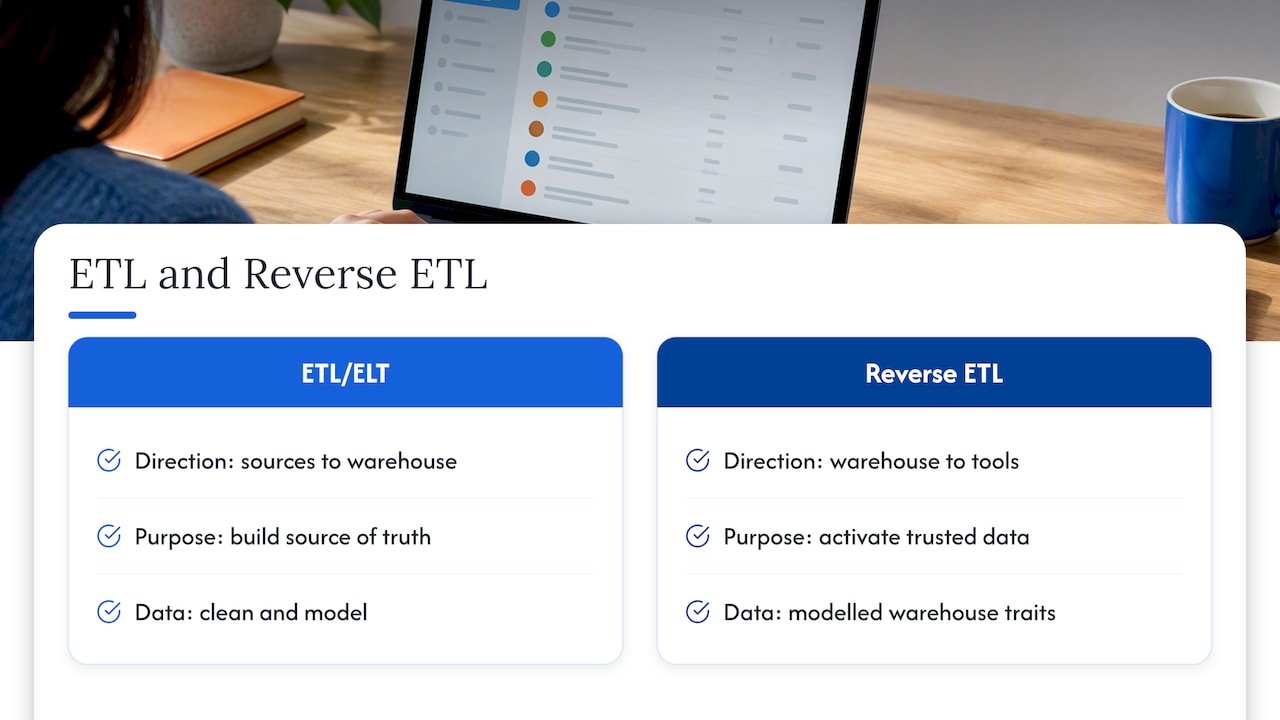
ETL and ELT move data in one direction: from source systems into your warehouse, where it gets cleaned, modelled and stored for analysis. Reverse ETL runs the opposite path. It takes data that has already been modelled in the warehouse and loads it back into the operational tools your teams use daily, your CRM, your support desk, your ad platforms.
That distinction matters because of what each direction is for. ETL and ELT exist to build a single source of truth. Reverse ETL exists to activate that truth where decisions actually get made. A dbt model that calculates a lead score is only useful to a sales rep if it shows up as a field on the Salesforce record they’re already looking at, not in a dashboard they have to remember to check.
We think of activation as closing the loop between analysis and action. Your data team builds the logic once, in the warehouse, and reverse ETL carries the output to wherever a rep, a marketer or an automation rule needs to see it.
Reverse ETL isn’t always the right tool. If you need a simple one-way sync of a handful of standard fields, a native CRM connector or a packaged integration may cover it with less setup. A customer data platform can also make sense when you need identity resolution and audience building bundled together. Reverse ETL earns its place when your warehouse already holds modelled, trusted traits and you need those traits delivered to several operational destinations on a schedule you control.
How reverse ETL works: process, architecture and common components
The pipeline follows a consistent shape across most implementations: model, extract, map, upsert, monitor.
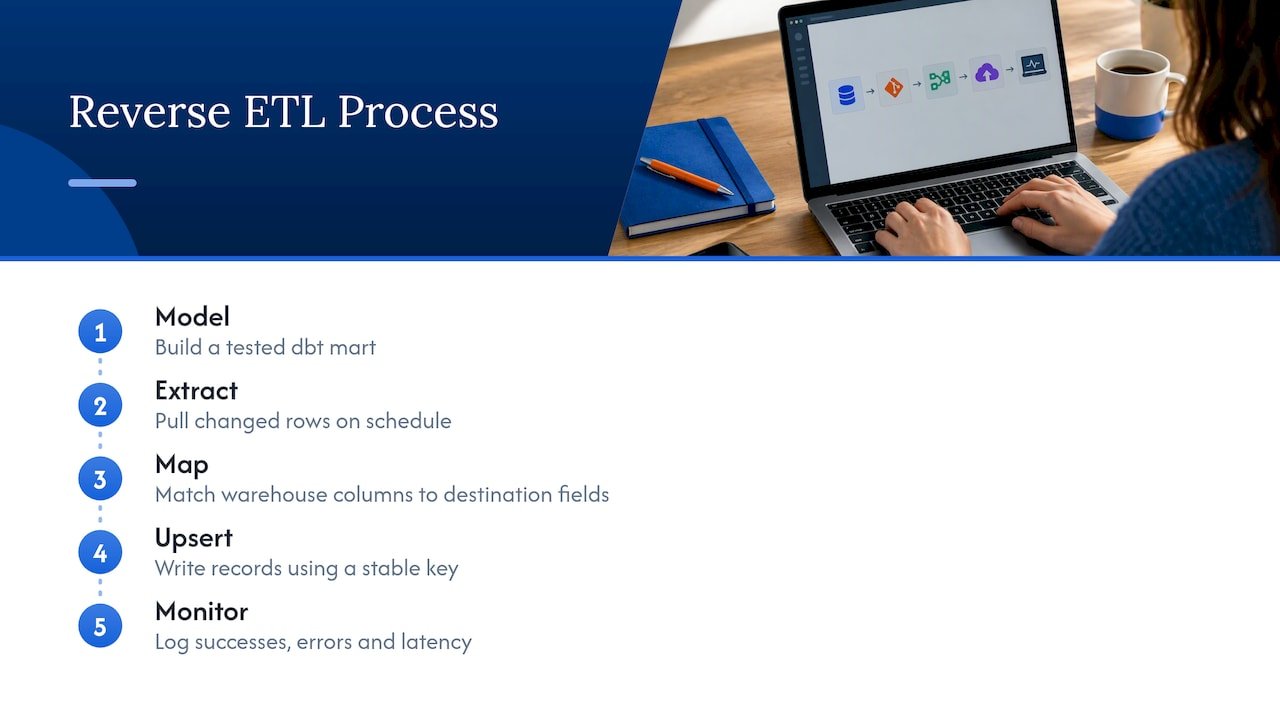
Model. Your analytics engineers build a dbt mart that calculates the trait you want to activate, a lead score, a churn-risk flag, an account health indicator. This is where business logic belongs, defined once, version-controlled and tested like any other piece of code.
Extract. The reverse ETL layer runs a query against that mart on a schedule, pulling only the rows that changed since the last run. Reusing existing dbt models rather than writing separate extraction logic keeps the warehouse as the single point of truth.
Map. Each warehouse column gets matched to a destination field, a CRM custom field, a support ticket property, an ad platform audience ID. This mapping layer also handles type conversion (a warehouse integer becoming a CRM picklist value, for instance) and flags mismatches before they cause sync failures.
Upsert. The sync writes records into the destination using a stable key, typically an external ID or the CRM’s own record ID, so updates land on the correct record rather than creating duplicates.
Monitor. Every sync run gets logged: records attempted, records succeeded, errors by type, latency. Without this step, failures go unnoticed until a sales manager asks why half the team’s leads show stale scores.
The architecture components behind this flow are the dbt marts themselves, the extraction queries, a mapping configuration (often stored as code for version control), a scheduler that triggers runs, and a monitoring layer that surfaces health metrics. Keeping business logic in the warehouse and out of the mapping layer limits how many destination-specific quirks creep into your pipeline, which matters once you’re syncing to more than one CRM or marketing platform.
Reverse ETL patterns for CRM activation: a lead scoring template
A practical starting point is a dbt mart built specifically for CRM delivery, not reused wholesale from a reporting model. One recommended pattern has dbt build the mart, with reverse ETL reading it and mapping columns directly to CRM custom fields.
A lead scoring mart typically includes:
- lead_id: the stable key used to reconcile the warehouse row with the CRM record.
- lead_score: the numeric output of your scoring model.
- score_tier: a simplified bucket (hot, warm, cold) that’s easier for reps to scan than a raw number.
- score_updated_at: a timestamp used both for delta detection and for showing reps how fresh the score is.
- score_breakdown (optional): the component signals driving the score, so reps see the reasoning, not just the output.
On the CRM side, this means creating custom fields on the Lead, Contact or Account object, matched to each mart column, and storing an external ID field so future syncs update the same record instead of duplicating it. Our guidance on making predictive lead scoring actionable goes deeper into backtesting these signals before they reach a rep’s screen.
The score_breakdown field deserves particular attention. A number alone tells a rep nothing about what to say on the next call. Surfacing the signals behind the score, something like “three product logins this week” or “a pricing page visit,” turns a black-box output into something a rep can act on immediately.
Sync frequency, delta-only strategies and API limits for CRM destinations
Cadence should match how the data gets used, not how often your warehouse refreshes.
- One to four hours works for most lead scoring use cases, where a rep checking a record expects a reasonably current number but doesn’t need it instantly.
- A faster cadence suits cases where a CRM field change needs to trigger a near-immediate automation, like routing a newly hot lead to a queue.
- A very frequent cadence is reserved for genuinely time-sensitive triggers, where delay has a direct cost, such as real-time intent signals feeding an outbound dialer.
Running every sync as a full-table refresh is the fastest way to exhaust an API quota. Using an updated_at watermark to compute deltas and syncing only rows that changed since the last run cut the record volume dramatically and keeps you well under rate limits.
Practitioners should audit CRM API concurrency and hourly request caps before deployment, since designing change-aware syncs that push deltas rather than full-table refreshes is what keeps a pipeline from hitting those hard caps during a routine sync window.
Beyond deltas, plan for concurrency limits and build retries with exponential backoff into every sync job. A single destination outage shouldn’t cascade into a backlog that floods the API once it recovers. Our notes on shipping real-time data syncs cover a pilot structure that bakes this in from the start.
Common CRM use cases and downstream automations
Reverse ETL earns its keep by feeding automations your sales, marketing and support teams already rely on.
- Sales enrichment and prioritization: firmographics, product usage and lead scores land on the CRM record so reps can prioritize without switching tools.
- Lifecycle marketing: warehouse-defined cohorts sync into the CRM or marketing platform to trigger automated nurture enrolment for the right segment at the right stage.
- Support prioritization: account health scores flow into the support desk so VIP or at-risk accounts get routed ahead of the general queue.
- Paid media audiences: cohorts built in the warehouse, like churned customers or high-value segments, sync out to ad platforms as suppression or lookalike lists.
Each of these depends on the same underlying mechanics: a trusted model, a stable key and a delivery schedule tuned to the use case. Our playbook on improving sales operations with Salesforce automation walks through how these synced fields typically plug into existing routing and assignment rules.
Build vs buy: choosing a reverse ETL platform or building your own
Most teams face this decision early, and the right answer depends less on preference than on scale and engineering capacity.
Managed reverse ETL platforms get you running quickly. They handle OAuth and authentication for dozens of destinations, give you a visual mapping interface, and ship with monitoring dashboards out of the box. The trade-off is licence cost that scales with data volume or destination count, and you’re working within whatever limits the vendor has built into their connectors.
Custom-built delivery services offer full control over extraction logic, retry behaviour and destination-specific handling, and at high volume the cost math can favour building. The catch is that your engineering team now owns authentication flows, rate-limit handling, error monitoring and every edge case a destination’s API throws at you.
A decision checklist worth running through before committing:
- How many destinations do you need to sync to today, and how many in the next year?
- What data volume are you moving, and does it justify engineering investment?
- What’s your tolerance for sync downtime, and who owns the on-call burden?
- Do you have governance requirements that demand full visibility into every sync step?
- Does your engineering team have capacity to maintain a custom service long-term?
Teams with a handful of destinations and limited engineering bandwidth generally do better starting with a managed platform. Teams with high volume, strict governance needs or unusual destination requirements often find a custom build pays off once they’re past the pilot stage.
Operational best practices: observability, error handling and governance
A reverse ETL pipeline that works in testing can still fail quietly in production unless you’re watching the right signals.
Track sync health as a standing metric: success ratio per run, latency from trigger to completion, and field-level error counts broken out by type. A slow upward drift in error rate is often the first sign of a schema change on the destination side, long before a rep notices stale data.
Idempotent upserts are non-negotiable. Using a stable key means a retried sync updates the same record instead of creating a duplicate, which matters once retries with exponential backoff become a routine part of your error handling. Monitoring sync health and resolving property or field type mismatches is a recurring maintenance task rather than a one-time setup step, since destination schemas change over time.
Rate-limit-aware concurrency control keeps a backlog from turning into a thundering herd against the destination API once a sync resumes after an outage.
Pro Tip: Keep a lineage record mapping each CRM field back to the dbt model and column that produced it, so a rep’s question about a stale score is easier to answer.
Storing external IDs consistently across every synced object is what makes that reconciliation possible when something needs tracing back to its source.
Pilot checklist: what to run first and how to measure success
Keep the first pilot narrow enough to finish in weeks, not quarters.
- Scope it tightly: one dbt mart (lead scores), one CRM object (Lead or Contact), a bounded record set or a defined change window.
- Write the runbook: mapping tests against a sandbox, a backfill plan for historical records, reconciliation queries to confirm counts match, and rollback criteria if something breaks.
- Set success metrics upfront: sync accuracy percentage, time-to-action for reps after a score updates, and conversion lift on the leads flagged as high-priority.
A pilot this size proves the mechanics work before you expand to more objects, more destinations or tighter cadences. Our walkthrough of pilot-ready AI lead enrichment for B2B GTM teams outlines a similar staged approach for scope and measurement.
Why the warehouse, not the sync tool, should own your logic
We’d push back on treating reverse ETL as the smart layer in this stack. The smart layer is dbt, where business logic lives once, gets tested once and updates in one place instead of being duplicated across destinations.
Reverse ETL works best as a thin, auditable delivery edge: extract, map, upsert, monitor, nothing more. Centralizing logic this way cuts duplication and lets a model change propagate to every destination on the next sync, with no need to re-engineer anything downstream.
— Don
How we help teams put reverse ETL to work in their CRM
Getting from a tested dbt model to a reliable sync running against Salesforce or HubSpot takes martech expertise most internal teams only build once they’ve been burned by a failed rollout. We design and run these integrations as part of our Martech Implementations and AI-enabled analytics work, building the mapping layer, the monitoring and the governance around it so your team doesn’t absorb that learning curve alone.
If you’re weighing a build versus buy decision for your own CRM destinations, our notes on custom agent deployment and managed integrations cover the same trade-offs from an implementation angle. For a lower-lift starting point, a custom CRM development agency can also be a useful resource if your immediate need is CRM customization rather than a full data pipeline. The fastest way to find out where you stand is to run a short pilot: pick one dbt mart, one CRM object and a clear KPI, and let us help you map it end to end. Get in touch through our services page to scope what that pilot would look like for your stack.
FAQ
What is reverse ETL and how is it different from a regular sync?
Reverse ETL loads modelled, already-trusted data from your warehouse into operational tools like your CRM, rather than pulling raw data into the warehouse the way ETL does. A regular point-to-point sync usually moves raw fields between two systems without the modelling step a warehouse-first approach provides.
How often should lead scores sync to the CRM?
A one to four hour cadence works well for most lead scoring use cases, giving reps a reasonably current score without taxing the destination API. Faster cadences, down to fifteen or thirty minutes, make sense only when a score change needs to trigger an automation almost immediately.
What causes most reverse ETL sync errors in CRMs?
Field type mismatches and missing record IDs are among the most common causes of sync failures between platforms like HubSpot and Salesforce. Monitoring sync health and catching mapping mismatches early prevents small schema changes from turning into larger backlogs.
Should we build a custom reverse ETL pipeline or use a managed platform?
Managed platforms get you running faster and handle authentication and monitoring for many destinations out of the box, which suits teams with a handful of destinations and limited engineering capacity. Custom builds offer more control and can be more cost-effective at high volume, but they require your team to own rate-limit handling, retries and monitoring long-term.
How do we design a reverse ETL pipeline that respects CRM API limits?
Audit the destination’s concurrency and hourly request caps before you deploy anything, then design syncs around deltas rather than full-table refreshes using an updated_at watermark. Pair that with retries using exponential backoff so a destination outage doesn’t create a surge of requests once it recovers.
Sources
- What is Reverse ETL (and how does it work)? | Twilio
- Reverse ETL Explained: Use Cases and How It Works
- Reverse ETL Patterns for CRM Activation
- Customer Data Platform Limits and Guidelines | Salesforce Help