

Choose MuleSoft when you need a governed, API-led integration backbone across many systems, including legacy and on-premises ones. Choose Workato when business teams need to automate cross-app workflows quickly in a cloud-first stack. Both are enterprise integration platforms, but they solve different problems, and picking the wrong one is expensive in either direction.
Below, we compare them on the criteria that decide real projects: architecture, API management, speed to value, security, AI agent support and cost. We also cover what to settle before you sign anything, because the platform is rarely the hardest part of an integration program.
TL;DR
- MuleSoft is built around API-led connectivity and full API lifecycle management. Workato is built around low-code workflow automation for business users.
- Workato typically gets a first automation live in days or weeks. MuleSoft programs are larger and are usually measured in months.
- MuleSoft deploys to cloud, hybrid and on-premises environments. Workato is cloud-first.
- Published pricing is scarce for both. Third-party estimates put MuleSoft well above Workato for comparable scope, and total cost depends on your volume and implementation effort.
- Whichever you pick, agent and automation governance, not the connector count, decides whether the investment pays back.
Table of Contents
- The core difference: API backbone or workflow automation
- Side-by-side comparison
- API management and integration depth
- Speed, effort and who has to build it
- Deployment, security and governance
- AI agents and agentic workflows
- What it costs
- Which team fits which platform
- A short decision path
- Where Brainiac fits
- FAQ
- Sources
The core difference: API backbone or workflow automation
The two products start from different philosophies. MuleSoft describes its approach as API-led connectivity: a composable foundation where systems are exposed as reusable, governed APIs, managed by developers across the full API lifecycle. Workato is a low-code, no-code automation platform where business users assemble workflows called recipes, with IT governance around them.
A useful image: MuleSoft is the road network, with a city planner deciding where the roads go, who may use them and at what speed. Workato is the fleet of delivery vans that use existing roads to get specific jobs done quickly. Cities need both, but you rarely buy them at the same moment or for the same reason.
In practice that means:
- MuleSoft fits a shared middle layer where many systems meet and one team owns the contracts between them.
- Workato fits individual business processes, such as lead routing, employee onboarding or quote-to-cash steps, that each get their own dedicated automation.
Note that MuleSoft’s own comparison page naturally frames the contrast in its favour, and Workato’s does the same. Treat both as statements of design intent and check them against your own workload.
Side-by-side comparison
| Criterion | MuleSoft | Workato |
|---|---|---|
| Core approach | API-led connectivity, developer-centric | Low-code recipes for business users |
| API management | Full lifecycle: design, policies, portal, monitoring | Basic versioning and an API platform to expose recipes as endpoints |
| Best-fit workload | High-throughput, complex enterprise integration | Automation-heavy, SaaS-centred workflows |
| Deployment | Cloud, hybrid, on-premises, Kubernetes | Cloud-first, with on-prem agents for hybrid access |
| Typical team | Integration developers and architects | Business analysts with IT oversight |
| Speed to first value | Months for a program | Days to weeks for a first automation |
| AI agent story | Agent Fabric, closely tied to Salesforce Agentforce | Agent Studio, Genies and an enterprise MCP server |
| Pricing model | Capacity-based (vCores) | Recipes, connections, task volume and tier |
API management and integration depth
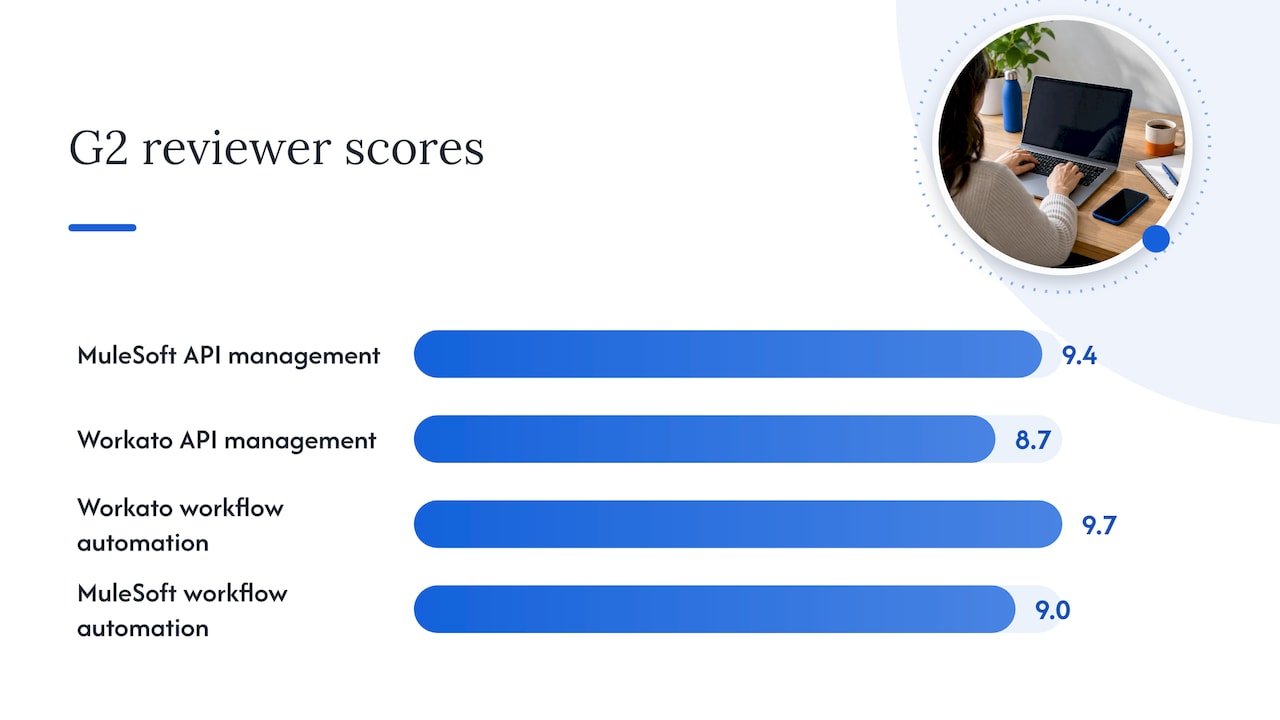
This is where the two diverge most. On G2 reviewer scores, MuleSoft Anypoint Platform scores 9.4 for API management against 8.7 for Workato, and its API Designer is singled out as robust for building and testing APIs. Workato leads on workflow automation at 9.7 against MuleSoft’s 9.0, with its Flow Designer praised for making complex workflows approachable, especially among mid-market users.
What that looks like on the ground:
- If you need to publish APIs, apply policies, version them, run a developer portal and report against service levels, you are describing MuleSoft’s home territory.
- If you need a Salesforce opportunity to trigger an approval in another tool, a ticket in a third and a finance update in a fourth, you are describing Workato’s.
Connector counts differ by source and by how each vendor counts them, so use them as a rough signal only. One Zapier comparison reports 1,400+ prebuilt connectors for Workato, aimed at SaaS apps and quick deployment, against 250+ for MuleSoft, which goes deeper on legacy systems and custom integrations. The meaningful question is not who has more connectors but whether the ones you need exist and are deep enough for your data model.
MuleSoft also states that its unified catalog is stronger for legacy systems, on-premises databases and EDI protocols, and that Workato can face limits with massive data volumes or high-frequency workloads. If your integration traffic looks like that, run your own volume test against the vendor’s current documentation before committing.
Speed, effort and who has to build it
Speed to value is the most common reason teams lean to Workato. Business analysts can build and change recipes without a long developer queue, so a first automation can ship in days or weeks. Larger Workato rollouts that need IT governance and complex flows take longer.
MuleSoft asks more up front. The tooling assumes dedicated integration developers, and a full program of an API layer plus dozens of integrations is a multi-month effort. Vendor-neutral commentary generally describes enterprise MuleSoft rollouts in the range of six to twelve months. Treat that as a planning range, not a promise, because scope and existing API maturity move it a lot.
The real question is who owns the platform after launch:
- A central IT or platform team with developers. MuleSoft’s investment in design and reuse pays back because many projects share the same assets.
- Business operations with light IT oversight. Workato’s recipe model lets those teams move without waiting, as long as someone owns standards for naming, credentials and change control.
- A mix of both. This is common, and it is where governance decisions matter most.
Deployment, security and governance
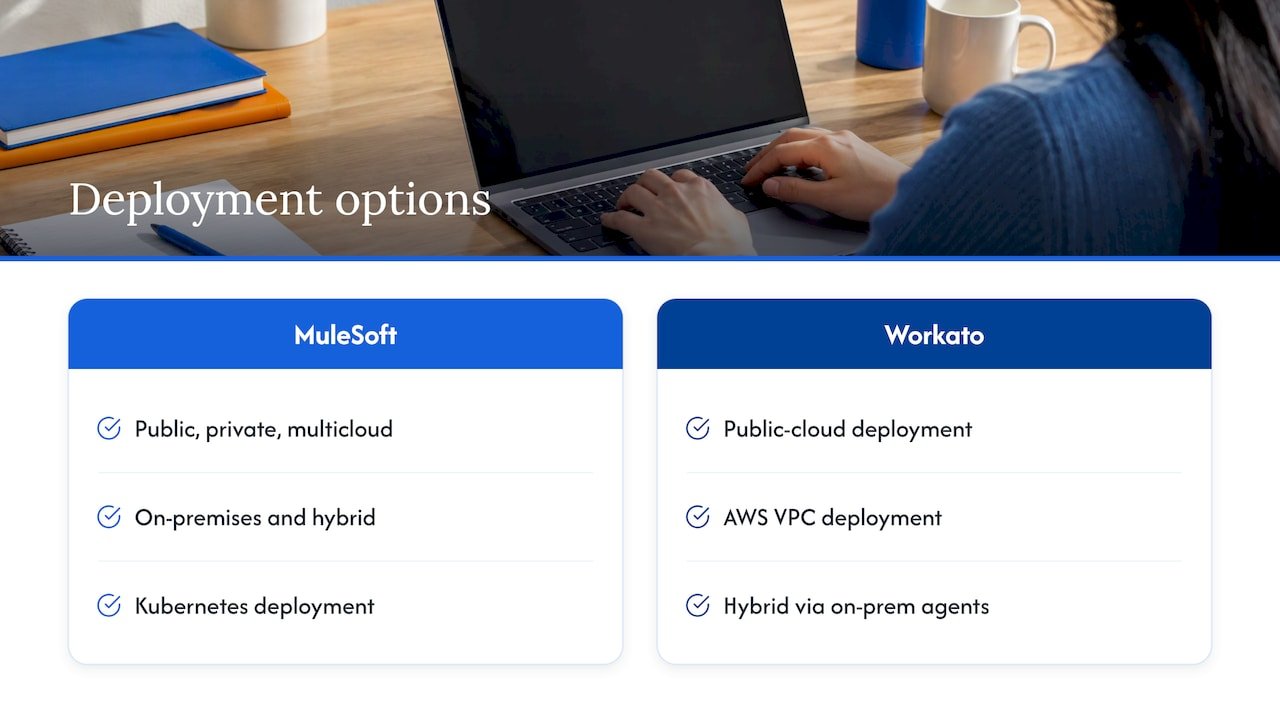
Deployment flexibility is a hard dividing line. According to MuleSoft, it supports deployment to public, private and multicloud, on-premises, hybrid and Kubernetes, while Workato deploys to public cloud or an AWS VPC, with hybrid access through on-premises agents. If regulation or data-residency policy keeps systems inside your own network, that difference may settle the decision on its own.
On security posture, both vendors publish extensive claims. Workato describes encryption in motion and at rest, audit trails, role-based access and a long list of certifications including SOC 1 and 2, ISO 27001, HIPAA, PCI and GDPR, with a dedicated isolated option. MuleSoft describes defense-in-depth security, HIPAA and GDPR compliance, and central policy enforcement meant to prevent API sprawl. Ask each vendor for its current compliance documentation for your industry and region.
Governance is bigger than certifications. Who may create an integration, who may call which API, what happens when a flow fails at 2 a.m.? Answering those questions early is what API governance without blocking delivery is about: central rules that protect the enterprise without turning every change into a ticket.
AI agents and agentic workflows
Both vendors now position their platforms as foundations for AI agents, with different emphases.
- Workato leans into agentic automation with Agent Studio, Genies and an MCP server, so agents can act across connected applications under role-based access and audit logging. According to Zapier’s 2026 comparison, this is a more active, autonomous direction.
- MuleSoft takes a more controlled route, with Agent Fabric as a governance, discovery and orchestration layer, and close integration with the Salesforce Agentforce ecosystem.
The pattern across the market is consistent: platforms expose tools to agents through MCP-style interfaces, add low-code agent builders, and add governance layers that decide who can call what under which policy. That last layer is where most agent projects succeed or stall, regardless of vendor.
An integration platform gives an agent reach. It does not decide what the agent should be allowed to do, how you validate its output, or which business outcome it serves. That design work sits above the platform, and it is where we spend much of our time with clients.
What it costs
Neither vendor publishes simple fixed pricing; both quote by scenario. Treat every figure below as an outside estimate, not a quote.
MuleSoft prices on runtime capacity (vCores). One independent benchmark puts list pricing at $60,000 to $150,000 per vCore per year, with large negotiated discounts common, especially in Salesforce bundles. The same source puts total annual spend at roughly $300K to $800K for mid-market and $800K to $3M+ for large enterprises. Other estimates run lower, so the spread itself tells you that scope drives the number.
Workato meters on recipes, connections, task volume and feature tier. Estimates for small teams start around $10,000 per year, and mid-market deployments often land in the tens to low hundreds of thousands, climbing as automation volume grows. A Zapier comparison describes MuleSoft as infrastructure-style pricing with higher upfront cost but more predictability, and Workato as SaaS-style usage pricing that can add up as automations scale.
Build your comparison on total cost of ownership across the contract term:
- License or subscription, including expected growth in volume.
- Implementation and specialist developer time in year one.
- Ongoing run costs: monitoring, upgrades, support and the people who maintain integrations.
- Bundle effects, if you already buy Salesforce products.
Mapping your actual workload (systems, events per day, peak loads) to each vendor’s pricing metric before comparing is the only valid comparison, because the metrics are not interchangeable.
Which team fits which platform
Use these profiles as a starting point.
MuleSoft tends to fit when:
- You run many systems, including legacy and on-premises ones, and want one governed integration layer.
- You need full API lifecycle management and a developer portal.
- You already invest heavily in the Salesforce ecosystem.
- You have, or will hire, integration developers and architects.
Workato tends to fit when:
- Your stack is mostly SaaS and the pain is manual cross-app work.
- Business operations, RevOps or finance teams want to build and adjust automations themselves.
- You want quick wins and can accept usage-based pricing.
- You prefer a cloud-first operating model.
Neither is a complete answer when: the real problem is unclear data ownership, inconsistent CRM fields or no agreed definition of a qualified lead. Integrating a messy process just moves the mess faster.
A short decision path
- List the systems and flows in scope, and mark which are legacy or on-premises.
- Decide who will build and who will run the platform in year two.
- Estimate volume and peak load, then ask each vendor to price that exact scope.
- Check deployment and compliance requirements against current vendor documentation.
- Define governance first: ownership, access, change control and monitoring.
- Pilot one real workflow end to end before committing to a multi-year term.
Our perspective
We spend our days where integration platforms meet revenue teams, and the pattern is consistent: the platform choice matters less than the clarity of the process it connects. A CMO who cannot trust attribution will not be rescued by a faster connector, and a sales team with duplicate CRM records will not be rescued by a better API gateway.
So we treat the MuleSoft versus Workato question as the second question. The first is which workflows move pipeline, which data they depend on, and what a human must still approve. Once that is mapped, the platform decision usually becomes obvious, and the work shifts to what sits on top: agents that enrich leads, hygiene routines that keep the CRM clean, and analytics that show leaders what is actually driving revenue.
We build in the open, with full visibility into how every agent and integration behaves inside your environment, and we work with the platforms you already run, including Salesforce, HubSpot, Marketo, Power BI and Tableau. Our view is that governance is a design input, not a final review. Start with one well-scoped agent, validate it against real outcomes, and expand only when it earns the right.
Don
Where Brainiac fits
If you are weighing integration platforms because you want AI agents to do real work across marketing, sales and finance, we can help you decide what to automate first and build it. Our AI strategy and readiness advisory covers readiness assessment, opportunity mapping, a roadmap and business case, and governance and guardrails. When you are ready to build, our custom agent deployment puts production-grade agents inside your own environment.
For teams worried about control, our AI agent governance implementation framework explains how we set access, validation and monitoring from day one. You can also see the full range of services on the Brainiac Consulting site.
FAQ
Is MuleSoft better than Workato?
Neither is better in general. MuleSoft is stronger for API-led, developer-driven enterprise integration with full API management, while Workato is stronger for fast, business-user-friendly automation. The better choice is the one that matches your systems, team and deployment requirements.
Is Workato cheaper than MuleSoft?
In most published estimates, yes, for comparable scope. Entry-level Workato figures start far below typical MuleSoft figures. Both vendors quote by scenario, though, so request pricing for your exact workload and compare total cost over the contract term, including implementation.
Can Workato replace MuleSoft?
Sometimes. If your needs are SaaS-to-SaaS workflow automation, Workato can cover them. If you depend on full API lifecycle management, on-premises or hybrid deployment, or high-throughput legacy integration, MuleSoft’s design is built for that, so a replacement needs a careful workload review.
Which is better for AI agents?
Both are investing heavily. Workato emphasizes building autonomous agents with Agent Studio and MCP, while MuleSoft emphasizes governed agent connectivity through Agent Fabric, especially alongside Salesforce. In either case, the agent’s scope, permissions and validation need to be designed deliberately.
Do we need a consultant to implement either one?
Not always, but MuleSoft programs typically need experienced developers and architects, and larger Workato rollouts benefit from clear governance. An outside partner helps most with scoping, prioritization and the agent and analytics layer on top of the platform.
Sources
- MuleSoft vs. Workato (MuleSoft)
- MuleSoft vs. Workato: A Detailed Enterprise iPaaS Comparison (Workato)
- Compare MuleSoft Anypoint Platform and Workato (G2)
- Workato vs. MuleSoft: Which is best? (Zapier)
- iPaaS Pricing Benchmarks 2026 (VendorBenchmark)
- API Governance Without Blocking Delivery (Polarising)