

Snowflake centralizes customer and campaign data into a governed, AI-ready platform so marketing teams can run near real-time measurement and AI-driven campaign intelligence without moving copies of data. Features like Snowflake Cortex and semantic views turn that unified foundation into something marketers can query directly, shrinking reporting cycles and sharpening measurement models like MMM, MTA and incrementality testing.
TL;DR:
- Use batch loading for daily CRM updates, but choose Snowpipe Streaming for ad impressions and web events when delays of hours undermine decisions.
- Build semantic models around verified business definitions, then test queries with known answers before giving wider teams access to Cortex Analyst or agents.
- Keep the first pilot bounded to one agent and one KPI, with a question narrow enough to answer in under two weeks.
- Set role based access, privacy controls, and per user credit limits before launch; Snowflake can block users who reach daily, weekly, or monthly caps.
- Keep ownership fields such as lead status in the CRM, map overlapping fields explicitly, and write back scores or segments rather than raw behavior events.
Table of Contents
- What Snowflake’s AI Data Cloud for Marketing is and why it matters
- Marketing use cases Snowflake supports
- How Snowflake unifies marketing data: ingestion and semantic views
- Native AI for marketing analytics: Cortex Analyst and Cortex Agents
- Measurement and optimisation patterns you can run in Snowflake
- Governance, privacy and cost controls for marketing analytics
- Activation and the martech ecosystem
- Practical implementation checklist and a pilot-first approach
- Best practices for connecting Snowflake to Salesforce, HubSpot and other CRM tools
- Strategies for automating lead enrichment and customer intent prediction
- Techniques for building custom AI agents for marketing operations
- Roadmap for implementing AI-driven marketing analytics
- Workforce enablement for adoption and training
- Treat the data foundation as an operating model, not a tool stack
- How we help you build on Snowflake marketing analytics
- FAQ
- Sources
What Snowflake’s AI Data Cloud for Marketing is and why it matters
Snowflake’s AI Data Cloud for Marketing is a governed foundation where customer, campaign and conversion data live in one place rather than scattered across spreadsheets, ad platforms and point tools. That matters because every copy of your data is another version that can drift out of sync, and every reconciliation job is a day lost before you can act on what the numbers actually say.
When teams stop moving data between systems and instead bring the analysis to where the data already sits, reporting that used to take days starts taking minutes, according to Snowflake’s guide to data-driven marketing. The platform-level payoff shows up in three places:
- Fewer reconciliation errors because there is one governed version of the truth, not five exports.
- Faster reporting cycles since teams query live data instead of waiting on static spreadsheet consolidation.
- A foundation that AI tools can actually trust, because Cortex and other native features work against clean, unified tables rather than patchwork extracts.
That combination, governance plus speed, is what makes the rest of this guide possible.
Marketing use cases Snowflake supports
Once customer, campaign and conversion data sit together in a governed warehouse, a handful of use cases become practical in ways they rarely are when data lives in silos. We see four show up again and again in marketing organizations:
- Mid-flight campaign intelligence: adjusting spend or creative while a campaign is still live, rather than waiting for a post-mortem report, which Snowflake’s marketing data guide frames as an emerging differentiator between teams that react and teams that only report.
- Customer 360 and identity resolution: stitching web, CRM, email and offline signals into one view of a person, which is the foundation every personalization and attribution model depends on.
- Personalization and propensity scoring: churn and conversion propensity models that run against unified behavioural data instead of a narrow slice of it.
- Forecasting and pipeline attribution: connecting marketing touchpoints to revenue outcomes in the same environment where sales and finance data already sit, so forecasts do not require a separate export-and-join exercise.
Each of these depends on the same prerequisite: data that has already been unified and governed, which is why the ingestion and semantic layer covered next tends to come first in any real deployment.
How Snowflake unifies marketing data: ingestion and semantic views
Getting marketing data into a usable shape involves two distinct jobs: getting it in, and making it understandable to both people and AI tools. Snowflake handles ingestion through several paths, chosen based on how fresh the data needs to be:
- Batch loading for data that updates daily or weekly, like CRM exports or finance reconciliations.
- Snowpipe Streaming for near real-time feeds such as ad impression logs or web event streams, where a delay of hours defeats the purpose.
- Native connectors that pull from common marketing and sales sources without custom pipeline code.
Once data lands, the harder problem is making it legible. Semantic views and semantic models map raw tables to business concepts like “qualified lead” or “attributed revenue” using YAML-based definitions, so a metric means the same thing everywhere it is used. According to Snowflake’s Cortex Analyst documentation, these semantic layers are what make accurate text-to-SQL possible, because the model is reasoning against defined business logic rather than guessing at raw column names. From there, secure views and data products let teams share curated slices of that data, internally or through the Marketplace, without duplicating it.
Native AI for marketing analytics: Cortex Analyst and Cortex Agents
This is where the unified, governed foundation starts paying off in daily work. Cortex Analyst turns natural-language questions into accurate SQL by reasoning against the semantic models described above, so a marketer can ask “what was our blended CAC last quarter” without writing a query or filing a ticket with analytics, per Snowflake’s documentation.
Cortex Agents go a step further: they run multi-step workflows that reason across structured tables and unstructured sources, calling tools like code execution, chart generation or custom procedures, all inside Snowflake’s governance model, according to Snowflake’s Cortex Agents documentation. In practice, that looks like:
- Asking a natural-language ROI question and getting a governed answer back in seconds, not a day-old dashboard.
- Running a mid-flight experiment where an agent flags underperforming creative and recommends a reallocation.
- Automating a creative test cycle: pulling results, comparing variants and surfacing a recommendation without a manual pull.
Pro Tip: Start Cortex Analyst with a small, verified set of sample queries before opening it to the wider team; accuracy on those first few questions tells you whether your semantic model needs more work.
Measurement and optimisation patterns you can run in Snowflake
Standard measurement techniques work better when they run against the same governed data that fed the semantic layer, rather than a separate extract built just for the analysis. A few patterns map cleanly:
- Marketing mix modelling (MMM) runs against unified ad spend logs and CRM outcomes rather than a spreadsheet stitched together once a quarter.
- Multi-touch attribution (MTA) benefits from the same unification, since every touchpoint already lives in one governed schema instead of three separate exports that need to be reconciled by hand.
- Incrementality testing and lift studies depend on log-level granularity, which is exactly what streaming ingestion and semantic views are built to preserve.
- Mid-flight optimisation, adjusting a live campaign based on signals from the first 48 hours, becomes possible when the measurement model can query current data instead of waiting for a batch refresh.
The common thread across Snowflake’s own framing is that measurement works best where the data already lives, not after it has been exported somewhere else for analysis. If you are building out incrementality programs specifically, our guide to always-on incrementality testing walks through the experiment design side in more depth.
Governance, privacy and cost controls for marketing analytics
Self-serve analytics and agentic AI only scale safely with guardrails in place before adoption grows, not after. Three controls matter most for marketing teams:
- Role-based access control (RBAC) and secure views, which limit who can see what without slowing down the people who legitimately need access.
- Privacy budgets and differential-privacy controls, which cap how much sensitive customer data a single query can expose, even to an authorized user.
- Per-user quotas, which cap AI and compute spend at the individual level.
Per-user quotas can enforce monthly, weekly and daily credit limits and automatically block a user who hits their cap, according to Snowflake’s documentation on per-user quotas, which also supports notifications and custom enforcement actions. That matters once Cortex Agents start running multi-step queries on their own; without a quota, one runaway workflow can quietly burn a month’s compute budget in a weekend.
Activation and the martech ecosystem
Unified data only matters if it eventually drives action, whether that is a retargeting list, an enriched lead record or a personalized email send. The Snowflake Marketplace provides data sets, models and applications that teams can use without copying anything into their own environment, which keeps governance intact end to end. From there:
- Secure shares and declarative sharing let you expose curated data to a partner or internal team without duplicating it, following patterns outlined in Snowflake’s declarative sharing tutorial.
- Native apps bundle logic and data together, useful when a partner needs both a dataset and the tooling to act on it.
- Partner apps versus building native: reach for a Marketplace partner app when the use case is common and well-served already; build native when your activation logic is specific enough that an off-the-shelf app would need heavy customization anyway.
Practical implementation checklist and a pilot-first approach
Most Snowflake marketing analytics programs stall for the same reason: teams try to unify everything before proving value on anything. A narrower sequence works better:
- Inventory and prioritize data sources, starting with ad logs, CRM records and conversion events, since those three alone cover most early measurement questions.
- Build semantic models and assemble a small, verified set of sample queries before opening Cortex Analyst to a wider audience.
- Run one pilot agent against a bounded question, such as mid-flight creative optimization or a single incrementality test, rather than a platform-wide rollout.
- Enable governance from day one: RBAC, privacy budgets, per-user quotas and cost monitoring, so the pilot does not become the reason governance gets added later as a fix.
- Measure the pilot’s outcome against a clear KPI before deciding whether to scale.
Pro Tip: Pick a pilot question narrow enough to answer in under two weeks, something like “which creative variant drove the most incremental lift in the last 48 hours”, so you get a clean read on accuracy before expanding scope.
In our own engagements, we structure this as a bounded pilot first: one agent, one use case, instrumented against a KPI, before any conversation about scaling. That sequencing is what our custom agent deployment work is built around, and it tends to surface governance gaps early, while they are still cheap to fix.
Best practices for connecting Snowflake to Salesforce, HubSpot and other CRM tools
Integrating Snowflake with the CRM and marketing automation platforms you already run is less about the connection itself and more about what happens to the data once it lands. A few practices consistently separate integrations that stay reliable from ones that quietly drift out of sync.
Treat the CRM, not Snowflake, as the system of record for ownership fields like lead status or opportunity stage, while letting Snowflake own derived metrics like attribution weight or propensity score. That split prevents the two systems from fighting over which value is correct. Sync frequency should match the decision it supports: lead scoring updates that feed a sales queue need near real-time sync, while quarterly pipeline attribution can run on a daily batch without losing anything meaningful.
Map fields explicitly rather than relying on name matching between systems. “Lead Source” in HubSpot and “Campaign” in Salesforce often describe overlapping but not identical concepts, and a semantic view that treats them as interchangeable will produce attribution numbers that do not reconcile with what sales sees in their own reports.
Finally, keep the integration’s write-back path narrow. Pushing enriched scores or segments back into Salesforce or HubSpot works well; pushing raw behavioural event data back tends to create duplicate objects and bloated records that slow the CRM down. For teams running this on Salesforce Marketing Cloud specifically, our integration service covers the connector and field-mapping work in more detail, and our broader martech consulting work applies the same field-ownership principle across HubSpot, Marketo and similar platforms.
Strategies for automating lead enrichment and customer intent prediction
Lead enrichment and intent prediction both depend on the same unglamorous prerequisite: enough unified behavioural and firmographic data in one place that a model has something real to learn from. Once that foundation exists, automation follows a fairly consistent pattern.
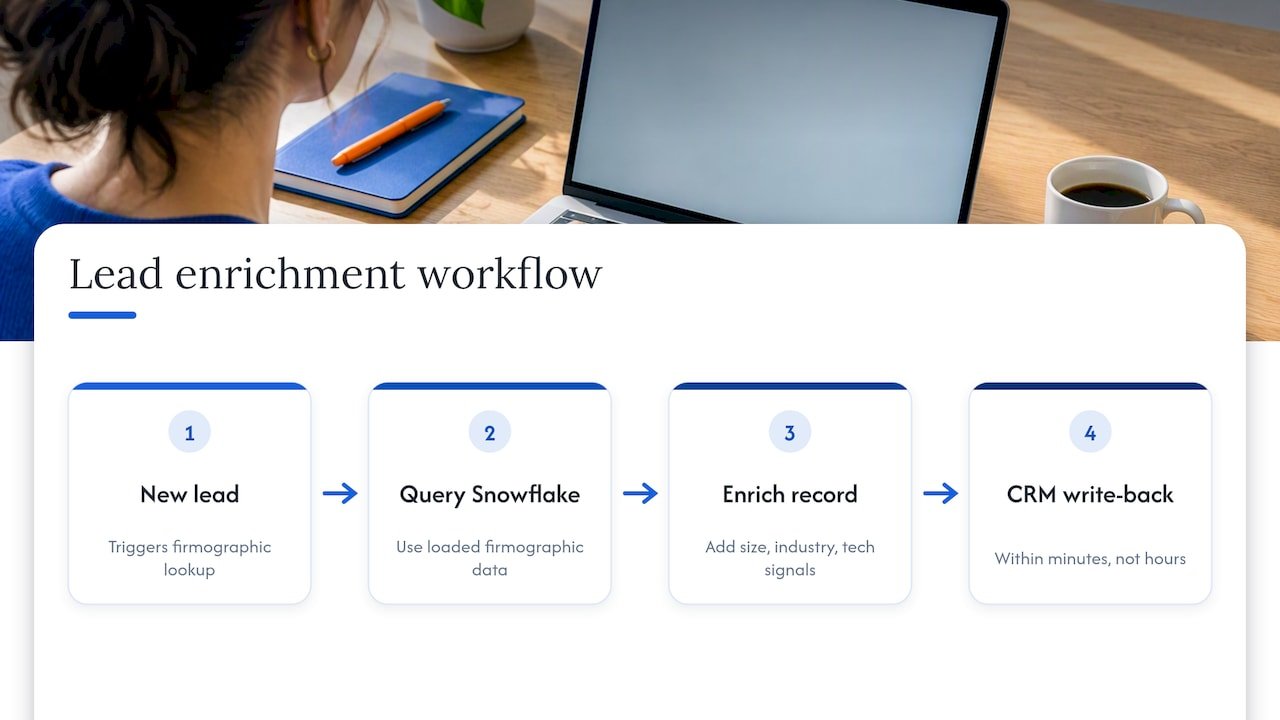
Enrichment itself should run as a scheduled or event-triggered workflow rather than a manual lookup: a new lead record triggers a query against firmographic data already loaded into Snowflake, appends company size, industry and technographic signals, and writes the enriched record back to the CRM within minutes rather than hours. That speed matters because a sales rep calling a lead with enriched context an hour after form-fill converts differently than one calling three days later with none.
Intent prediction works best as a propensity score trained on unified behavioural signals, page visits, content downloads, email engagement and prior purchase history, rather than any single signal in isolation. The model does not need to be exotic; a well-tuned logistic regression against clean, unified data routinely outperforms a sophisticated model trained on a narrow, siloed data set.
Where Cortex Agents add real value here is in closing the loop: an agent can watch for a lead crossing an intent threshold and automatically trigger an enrichment pass, a scoring update and a notification to the right rep, all inside the governed environment rather than through a brittle chain of third-party tools. We build this kind of automation as part of our agentic AI enablement work, where the enrichment and scoring logic lives as a managed agent rather than a one-off script someone has to maintain.
Techniques for building custom AI agents for marketing operations
Building an agent that actually holds up in production looks different from a demo that answers one clever question well. The techniques that matter most come down to scope, tooling and verification.
Scope the agent to a single, bounded job before giving it more than a few tools. An agent that handles mid-flight budget reallocation and nothing else is far easier to trust, debug and govern than one asked to also handle creative testing, lead scoring and reporting. Snowflake’s Cortex Agents framework supports this by letting an agent call specific tools, code execution, chart generation, search, or custom procedures, scoped tightly to the task at hand, according to Snowflake’s documentation.
Ground every agent in a verified semantic model rather than letting it reason against raw tables. The semantic layer is what keeps an agent’s answers consistent with how your team already defines metrics like qualified lead or attributed revenue, and it is the single biggest lever for reducing hallucinated or inconsistent outputs.
Build in a verification step before an agent’s output reaches a human decision-maker or, worse, triggers an automated action like a budget shift. A small set of test queries with known correct answers, run every time the semantic model changes, catches regressions before they reach production.
Finally, treat governance as part of the agent’s design, not an afterthought bolted on later: RBAC scoping and per-user quotas should be configured before the agent goes live, not after a cost spike forces the issue. Our view, consistent with our open methodology, is that an agent’s tooling and guardrails should be visible and auditable from day one, which is part of why we favour narrow, verifiable pilots over broad agent rollouts; our engineering guidance on agent design goes deeper on keeping an agent’s tool count small until there is a real need to expand it.
Roadmap for implementing AI-driven marketing analytics
A realistic roadmap for bringing AI-driven analytics into a marketing organization runs in phases, and skipping ahead is usually what causes expensive rework later.
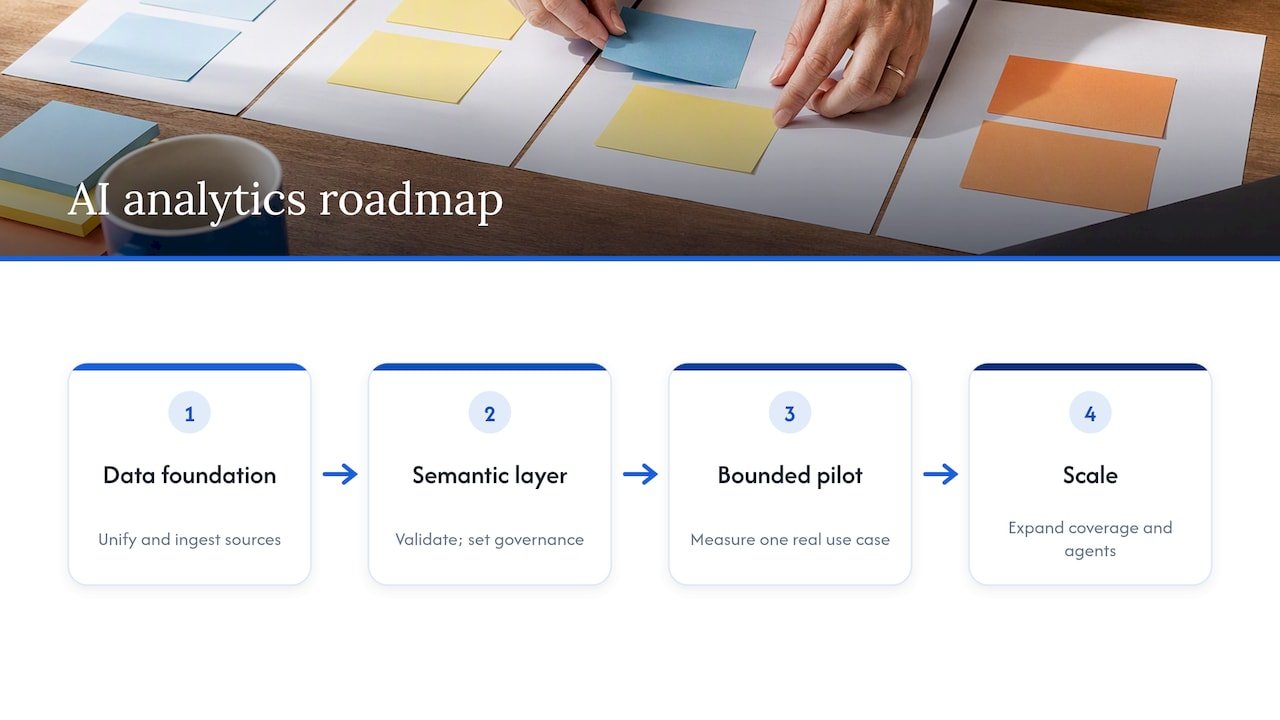
The first phase is foundation work: inventory the data sources worth unifying first, typically ad logs, CRM records and conversion events, and get them into Snowflake through the ingestion path that matches their freshness needs. This phase has no AI in it yet, and that is intentional; a semantic model built on messy source data will produce confident, wrong answers.
The second phase builds the semantic layer and validates it against a small set of known-answer queries, the same verification step that matters for custom agents. This is also where governance, RBAC, privacy budgets and per-user quotas, should be configured, before anyone starts querying in natural language.
The third phase is a single pilot: one Cortex Analyst or Cortex Agent use case, bounded and measurable, run against a real business question rather than a synthetic demo. The pilot’s job is to prove accuracy and value on a narrow slice before anyone commits budget to a wider rollout.
The fourth phase scales what worked, expanding the semantic model’s coverage and adding agents for adjacent use cases only once the first one has a track record. Snowflake’s Modern Marketing Data Stack report frames this broader shift as organizations reorganizing their stacks around governed data rather than application-led tool sprawl, treating governance and composability as prerequisites for scaling agentic workflows rather than nice-to-haves added later. Our own AI readiness and roadmap work follows this same four-phase sequence, because the organizations that skip the foundation phase are the ones that end up redoing it under pressure six months later.
Workforce enablement for adoption and training
The best semantic model in the world does not help if the marketing team does not trust it enough to use it instead of their old spreadsheet. Enablement, not tooling, is usually the harder half of this work.
Start training with the questions people already ask, not a generic tour of features. If a campaign manager’s first instinct every Monday is “what did we spend last week and what did it return,” teach Cortex Analyst against that exact question first, so the tool proves its value in the first five minutes rather than the fifth training session.
Build a short list of verified, trusted queries that the team can see work correctly before asking them to try their own. This mirrors the same verification discipline used to build the semantic model itself: trust gets built on accuracy demonstrated early, not on a feature list.
Identify a handful of early champions on the marketing team, people who are naturally curious about the data, and let them pressure-test the tool before a wider rollout. Their feedback tends to catch gaps in the semantic model that a technical team would not think to ask about, because they ask questions the way marketers actually think, not the way a data model is structured.
Finally, keep training ongoing rather than a one-time event. As the semantic model expands to cover new metrics or data sources, a short refresher on what changed keeps the team’s trust intact instead of letting it erode the first time a familiar query behaves differently.
Treat the data foundation as an operating model, not a tool stack
The teams that get real value here did not add a point tool, they changed how data gets governed and used. A pilot-first culture, with RBAC, privacy budgets and quotas built in from the start, matters more than any single feature.
— Don
How we help you build on Snowflake marketing analytics
A Snowflake marketing analytics rollout can be approached like any agentic AI deployment: start narrow, prove it, then scale with governance already in place. Work may include pilot agent builds for use cases like mid-flight optimization or incrementality testing, semantic modelling to get Cortex Analyst production-ready, and RBAC, privacy budget and quota setup to keep costs and access predictable as adoption grows.
A typical engagement starts with a short readiness conversation about which data sources and questions matter most to your team, moves into a bounded pilot against one real business question, and only then discusses what scaling looks like. If you are weighing whether Cortex Analyst or a traditional dashboard fits your team’s workflow better, our AI analyst versus BI dashboard breakdown is a useful next read. When you are ready to talk through a pilot, our AI strategy and readiness services page is the place to start.
FAQ
What is Snowflake analytics?
Snowflake analytics refers to running measurement, reporting and AI-driven queries directly against data stored in Snowflake’s governed platform, rather than exporting it elsewhere first. This includes native tools like Cortex Analyst for natural-language querying and Cortex Agents for multi-step automated workflows.
What is Snowflake marketing?
Snowflake marketing describes using Snowflake as the unified foundation for customer, campaign and conversion data so marketing teams can run measurement models like MMM, MTA and incrementality testing where the data already lives. Snowflake’s own guide frames this as a shift from static spreadsheet reporting to near real-time, AI-driven campaign intelligence.
What is marketing analytics used for?
Marketing analytics is used to measure how campaigns, channels and creative perform against business outcomes, so teams can allocate budget toward what is actually driving results. Common applications include attribution, marketing mix modelling, incrementality testing and forecasting pipeline contribution, often run on a unified data platform to avoid reconciling numbers from multiple separate tools.
What is the controversy surrounding the Snowflake company?
Public discussion around Snowflake has centred on data security incidents involving customer accounts that lacked multi-factor authentication, which is a reminder that governance controls like RBAC and per-user quotas, covered earlier in this guide, need to be configured deliberately rather than assumed. For current details on any specific incident, we’d point you to Snowflake’s own security disclosures rather than a secondhand summary.
How do semantic views improve Snowflake marketing analytics?
Semantic views map raw database tables to business concepts, like “qualified lead” or “attributed revenue”, using defined models rather than leaving an AI tool to guess at column names. According to Snowflake’s Cortex Analyst documentation, this mapping is what improves the accuracy of natural-language, text-to-SQL queries in production settings.